My Hero · iPhone & Android

Run your practice from your phone.

Your schedule, your notes, your inbox, and controlled-substance signing — in your pocket. And for your patients: their records, their care team, and the devices they already own.

Free with every Hero EMR practice.

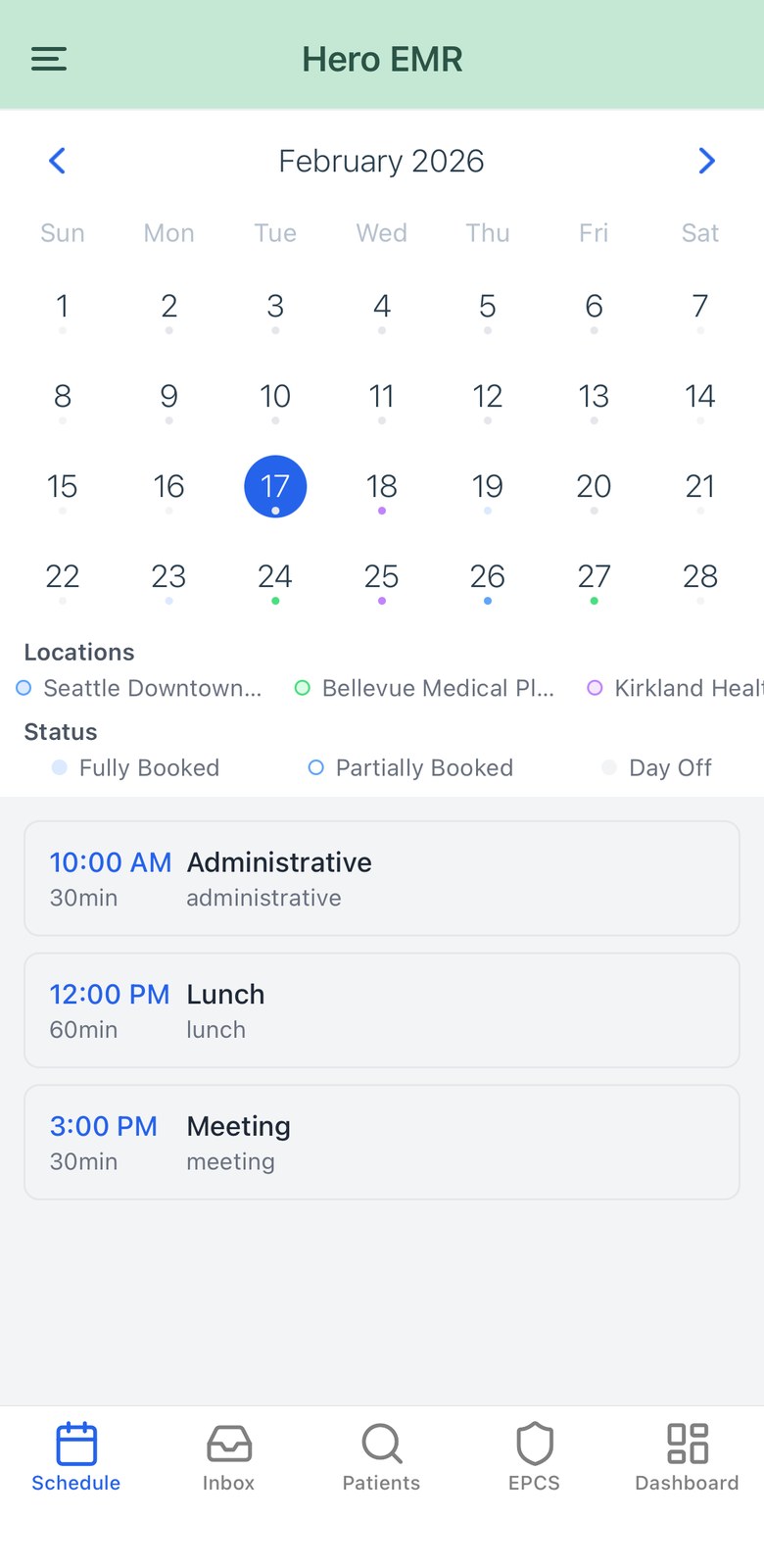
The Hero physician app schedule, showing a month calendar and the day's visits
Built for HIPAA-regulated care
Passkey & two-factor sign-in
iPhone and Android
No extra licence fee
For physicians For patients
For physicians

The whole day, in one thumb.

Not a companion app that shows you a read-only calendar. The mobile app opens the encounter, records the visit, works the inbox, and signs controlled substances — the same data, the same permissions, the same chart as the desktop EMR.

The agenda knows what still needs you

Every row carries the state of its encounter, not just the appointment — so the day reads as work, not as a list of names.

  • “6 visits · 2 to sign” at the top of the day, so nothing quietly waits for a signature.
  • Status on every row: Checked in, Note in progress, Ready to sign, Signed.
  • Tap a row and it does the right thing — Start, Resume, Review & Sign, or open an addendum.
  • Colour-coded location dots when you work across sites, and a red marker on days holding an outside commitment.
  • Every date is your practice's day, not your phone's — travel across timezones and “today” still matches the front desk.

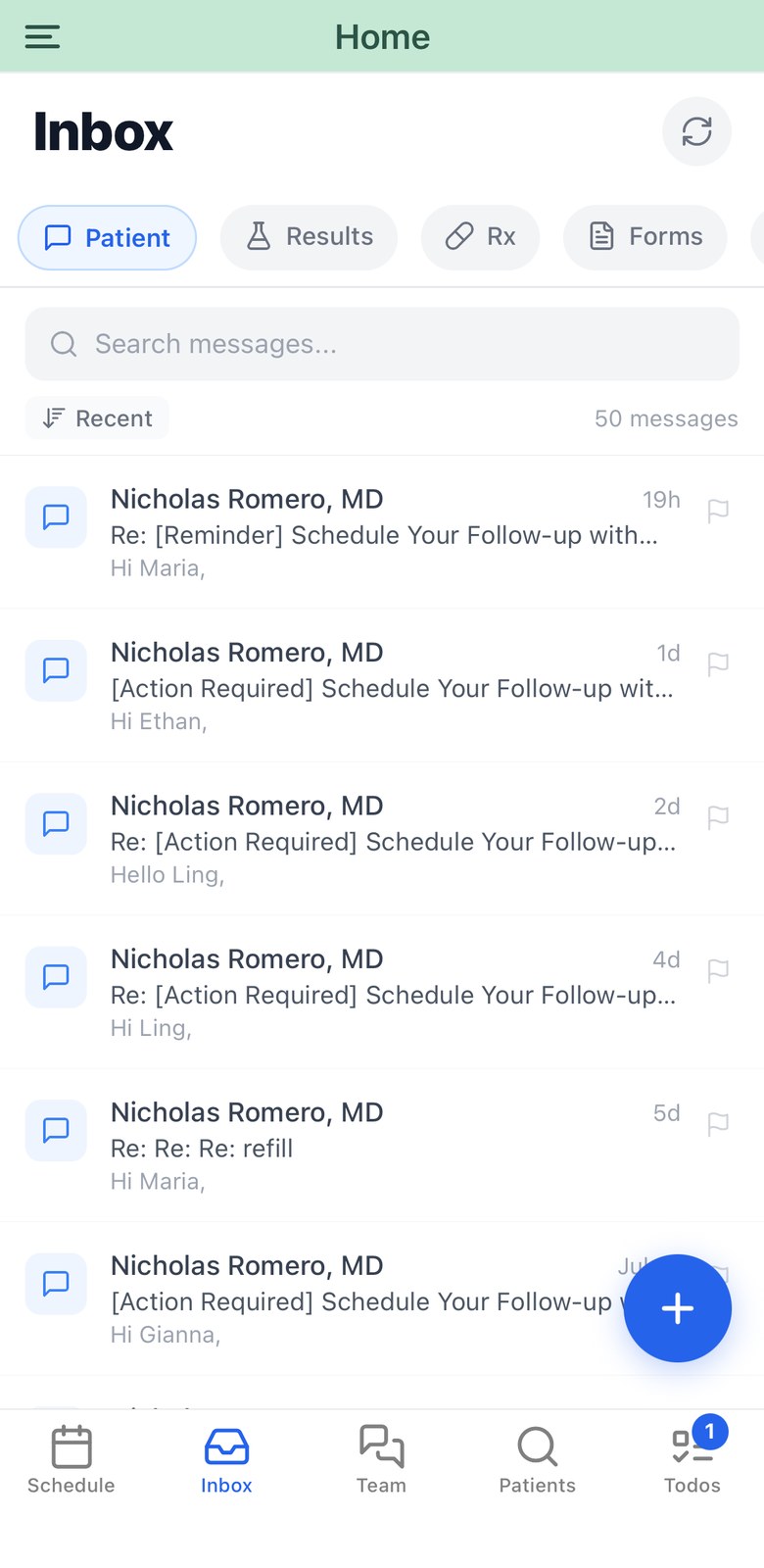
Eight queues, one thumb

Patient threads, results, refills, forms, staff notes, referrals, faxes and inquiries — each with its own unread count, and each with the action that actually closes it.

  • Approve or deny a refill with a structured denial reason, right from the queue.
  • Record how you answered a result — message, call, SMS, portal or in person.
  • Approve or reject a form with notes; link an incoming fax to the right patient.
  • Forward a thread to a colleague, flag it, or mark it complete — shared state with the desktop inbox.
  • Care team chat alongside it, with urgent messages that break through as a banner.

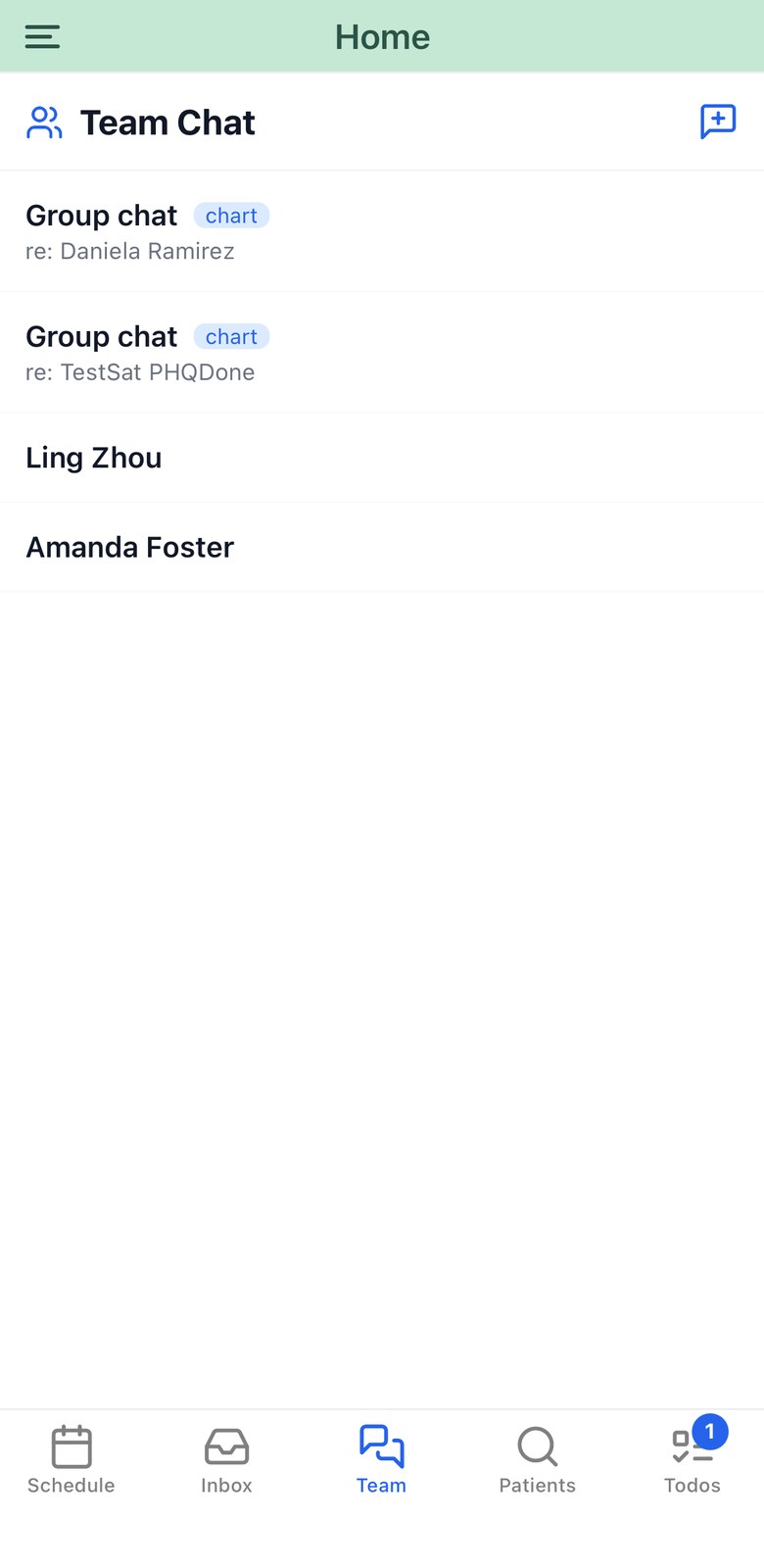
The conversation that belongs in the chart

Direct and group messages with your staff, live, with urgent messages that break through as a banner wherever you are in the app.

  • Set a topic patient on a conversation, then file the whole thread into their chart.
  • Saved conversations are tagged chart, so it is obvious what has already been filed.
  • Messages arrive over a live connection and reconcile after a dropout — nothing depends on the socket staying up.

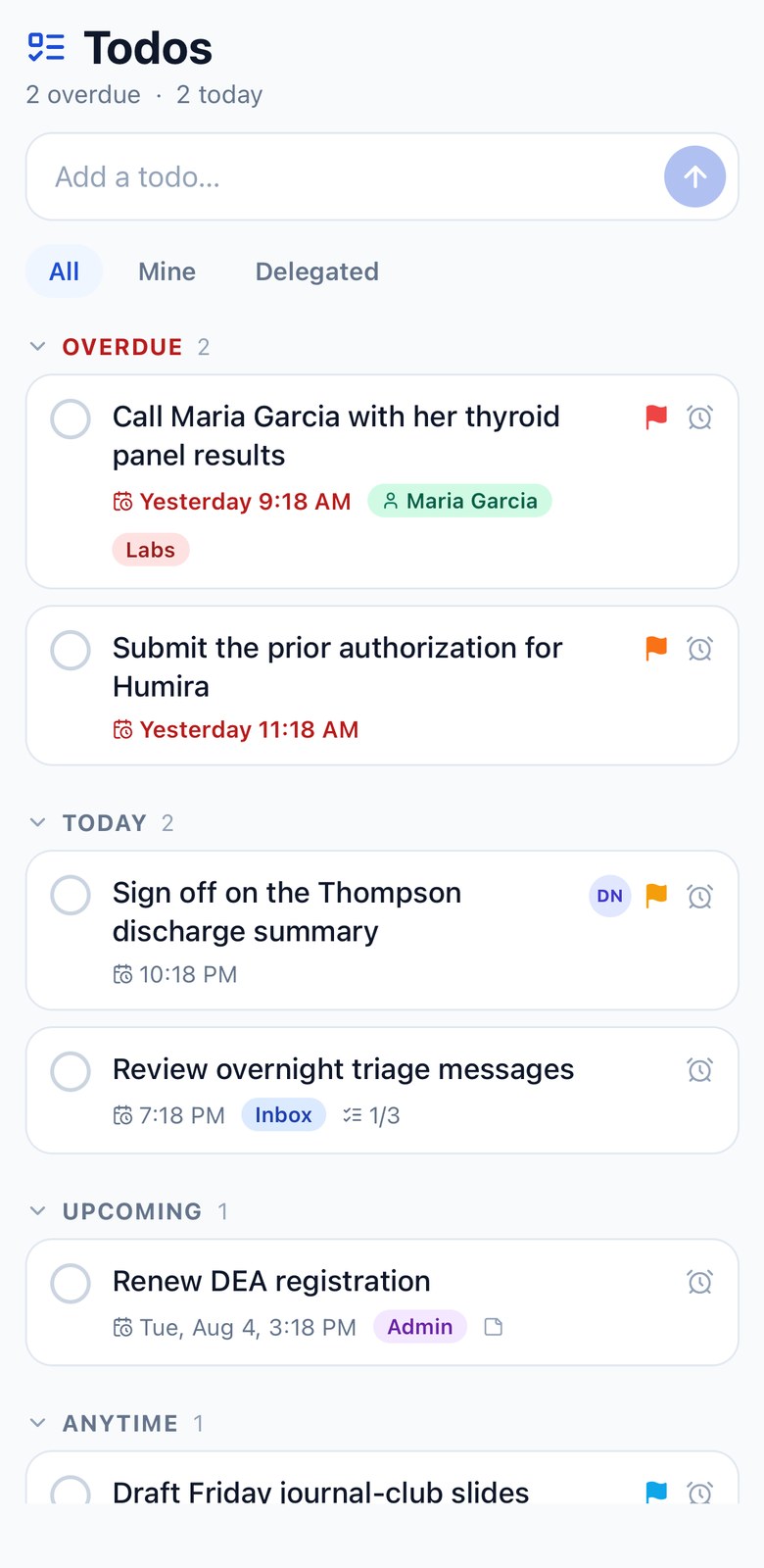
The shared list your practice actually runs on

One org-wide todo list, live between the phone and the browser. Overdue, today, upcoming, snoozed — all bucketed in the practice's timezone.

  • Delegate to anyone on the team, and see what you've handed off.
  • Link a task to a patient and jump straight into their chart.
  • Snooze until later today, tomorrow morning, or next Monday — it disappears until then.
  • A badge on the tab counts only what's actually actionable today. Snoozed work never nags.

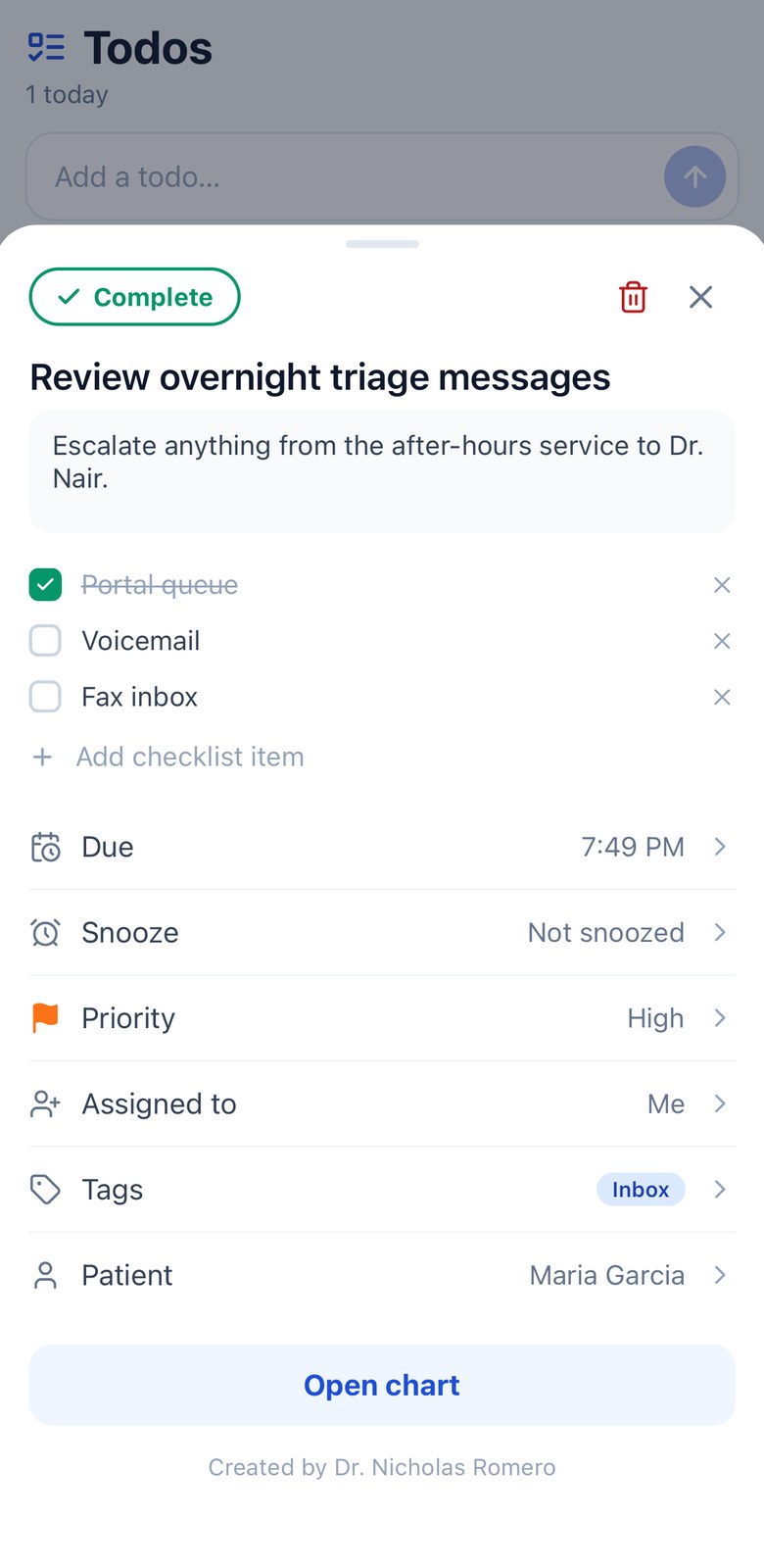
Deep enough to finish the thought

Open a task and it's a real record, not a line of text: notes, a checklist, priority, tags, who owns it, and which patient it belongs to.

  • Checklists for the multi-step ones — the row shows 1/3 without opening it.
  • A linked patient is one tap from their chart, and recents make attaching one quick.
  • Everything saves the moment you tap it, and reverts cleanly if the network drops.
  • Tick it off by mistake? A five-second undo sits at the bottom of the screen.
Physician schedule with a month calendar, location legend and the day's agenda
Physician inbox with category filters and patient message threads
Care team chat list with group conversations saved to a chart and direct messages with colleagues
Shared todo list grouped into Overdue, Today and Upcoming
Todo detail sheet with notes, a checklist, and rows for due date, snooze, priority, assignee, tags and patient
Live calendar sync

Your calendar and your clinic, finally agreeing.

Connect Google Calendar or Outlook once. From then on your outside commitments block your Hero availability, and your Hero visits appear in the calendar you already live in.

Google or Outlook The calendar you already keep
Busy times come in
Hero visits go out
Hero EMR Your bookable availability

Two directions, two switches

Import and export are independent, per provider. Block your Hero availability from an outside calendar without ever pushing clinic data outward — or do both.

Patient details are opt-in, on purpose

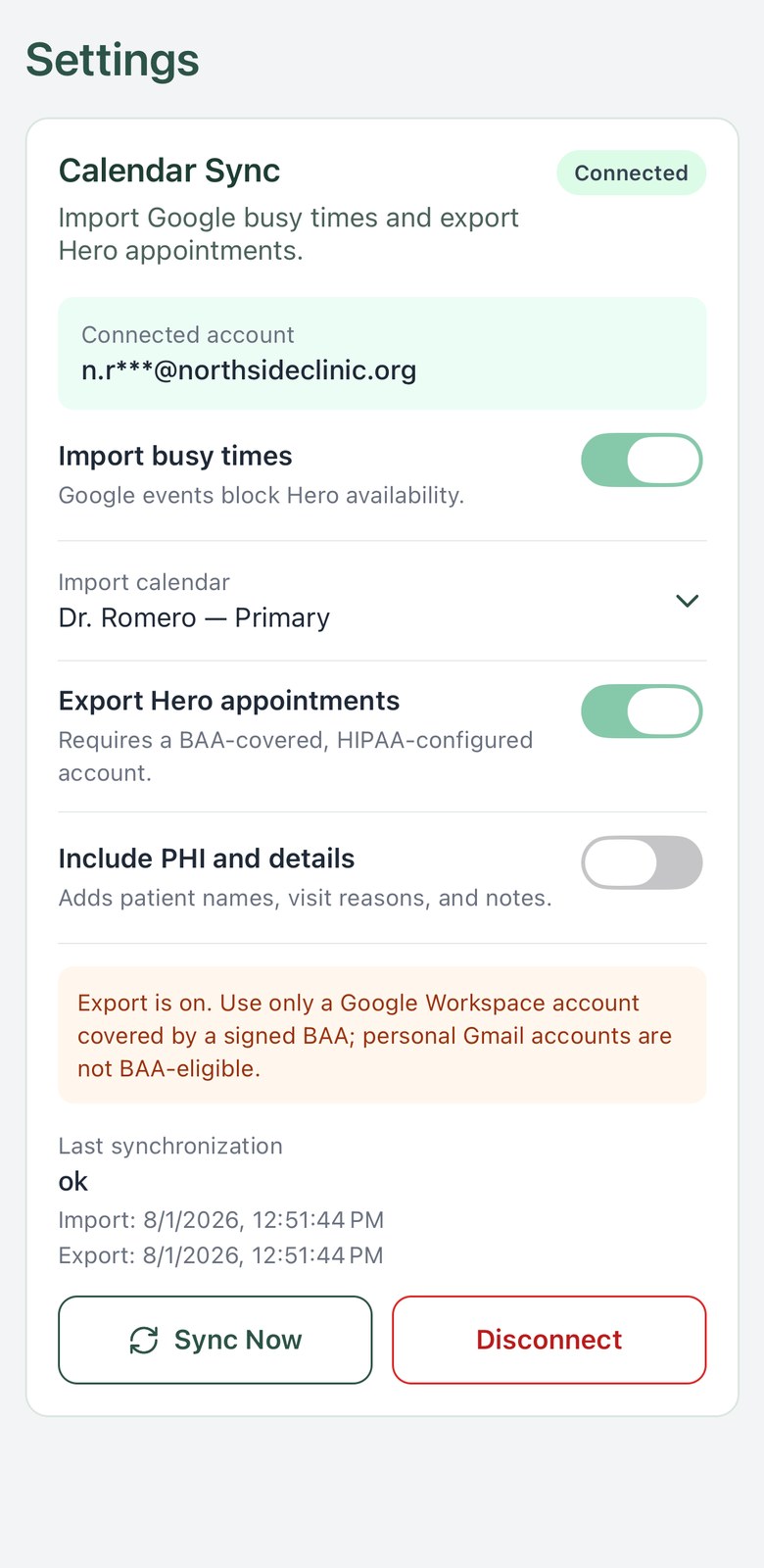
Exporting appointment details is a separate switch with its own acknowledgement. Hero tells you plainly that PHI will sit on the provider’s servers, and that this belongs on a BAA-covered Google Workspace or Microsoft 365 account — personal Gmail and Outlook.com accounts are not BAA-eligible.

Blocked time reads as blocked time

An outside commitment shows up on the agenda as a red, non-clinical block. It can't be opened as a visit, and the month view marks the day so you see it coming.

Sync now, and know where you stand

Trigger a sync by hand and watch the schedule catch up. The settings screen shows the connected account, the last import, the last export, and any error worth acting on.

Calendar sync settings on iPhone: connected account, import and export switches, the PHI toggle, last sync times and a Sync Now button
In the room

Talk. The note writes itself.

Open the encounter from the schedule and the full Hero note editor comes with it. Record the visit ambiently, dictate straight into the note, and sign — without opening a laptop.

Ambient visit recording

Start recording and put the phone down. Audio uploads continuously in small chunks with retries, so a lift ride or a dead zone doesn't cost you the visit — you get a “weak connection, audio is cached” note instead of a lost recording.

Literal dictation

A second microphone types what you say directly into the note, cleaned up by the same engine as the desktop's dictation — punctuation, casing and all — then inserted where your cursor was.

It survives the interruption

A phone call pauses the recording and offers to resume. Walk out of the room and a floating pill keeps the timer with you. If the app is killed mid-visit, the session is offered back to you the next time you open it.

Recoverable sessions

Live on the Dynamic Island

On iPhone, the recording lives on the lock screen and in the Dynamic Island with a running timer — through “Transcribing”, “Writing note” and “Open Hero to finish your note”.

iPhone · iOS 16.2+

Sign it, or add to it

Review and sign from the phone. Tap a visit that's already signed and Hero asks whether you meant to start an addendum, rather than quietly reopening a legal record.

The chart, and a camera

Notes, labs, imaging and medications for any patient — plus prescribing with a sig builder, diagnosis search and pharmacy preferences. Photograph a wound or a document and it files straight into the chart.

Controlled substances

Your phone is the second factor.

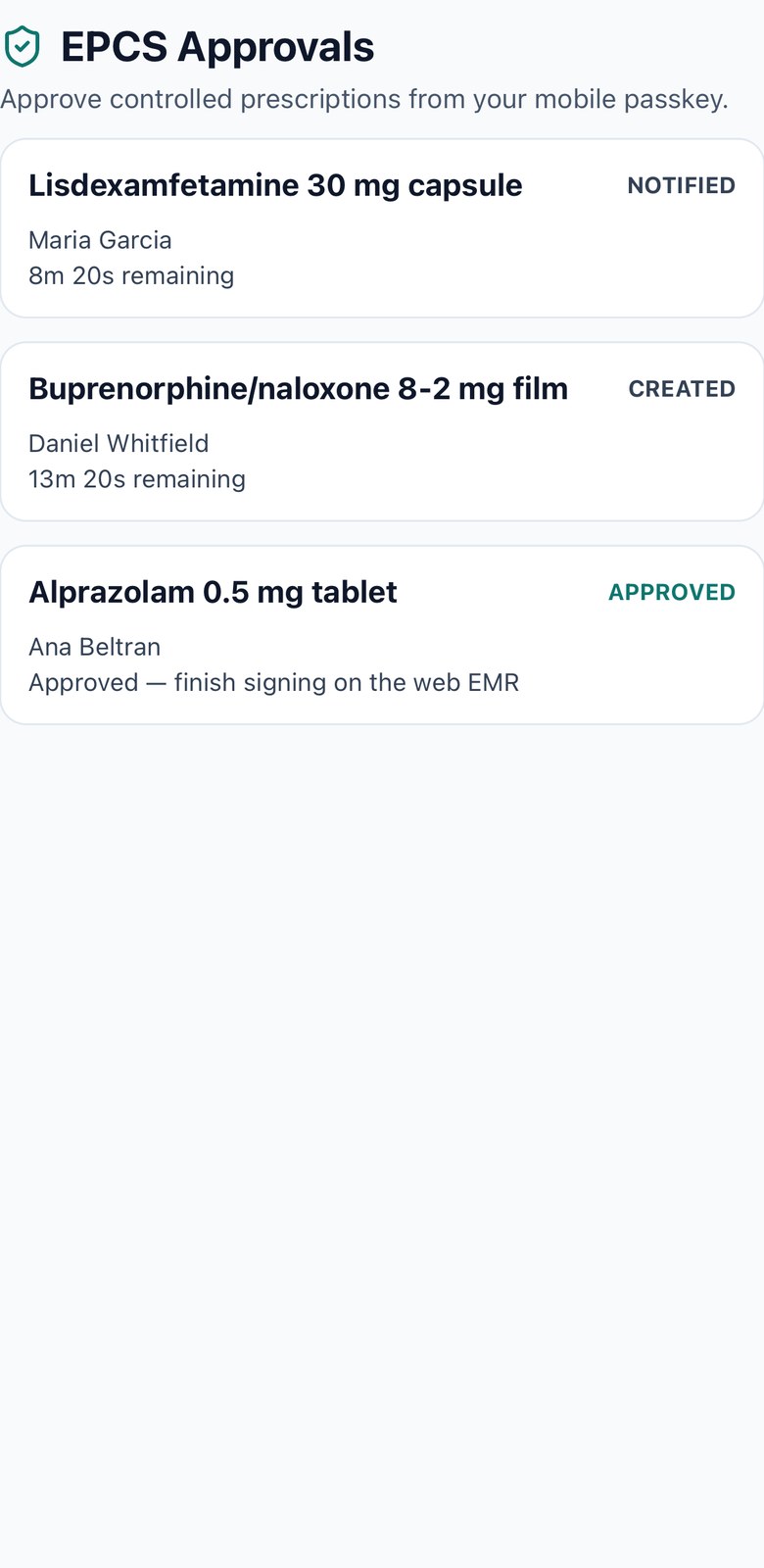
EPCS signing asks for something you have and something you are. Hero makes that your enrolled phone and your face — no keyfob, no token to lose.

EPCS approvals on iPhone: three controlled-substance signing requests with their status and time remaining

A push, a review, a passkey

The request arrives as a notification. You see the drug, strength, directions, quantity, refills, schedule and the patient — then approve with Face ID, Touch ID or your device passcode.

Only devices you enrolled

A phone can't approve anything until it's been redeemed as an approved signing device with its own passkey. Enrollment status, approved devices and your primary device are visible in the app.

Prescribe from the phone too

Write a controlled prescription on mobile and the app opens the signing session, waits for your approval, and only then transmits. Nothing leaves as a prescription until it's been signed.

Security & compliance

Built for regulated care, not retrofitted.

A phone in a clinic is a phone that leaves the clinic. These are the controls that assumption produced.

Passkeys, not passwords

Native WebAuthn on both platforms, backed by the device's own biometric or passcode. The credential never leaves the phone's secure hardware, and there is nothing to phish.

Two-factor for clinicians

Clinical MFA by passkey or SMS, with the enforcement level set by your practice — off, report-only, a grace period, or strictly enforced. A web session can even be confirmed with the passkey on your phone.

Device enrolment for EPCS

Controlled-substance approval is bound to devices your practice has explicitly enrolled. A stolen password on an unknown phone approves nothing.

Encrypted on the device

Anything queued locally — vitals waiting on signal, message drafts, trusted-device tokens — is held in the operating system's keychain, not in plain storage. A repo guardrail fails the build if that ever regresses.

PHI stays out of the logs

Transcripts are never written to disk or to a log. Diagnostic logging is redacted and silent in release builds, and an automated check in the build pipeline enforces it file by file.

Features fail closed

Capabilities are gated by your organization's policy and a minimum app version, evaluated fail-closed: if the answer is missing or malformed, the feature stays off rather than guessing.

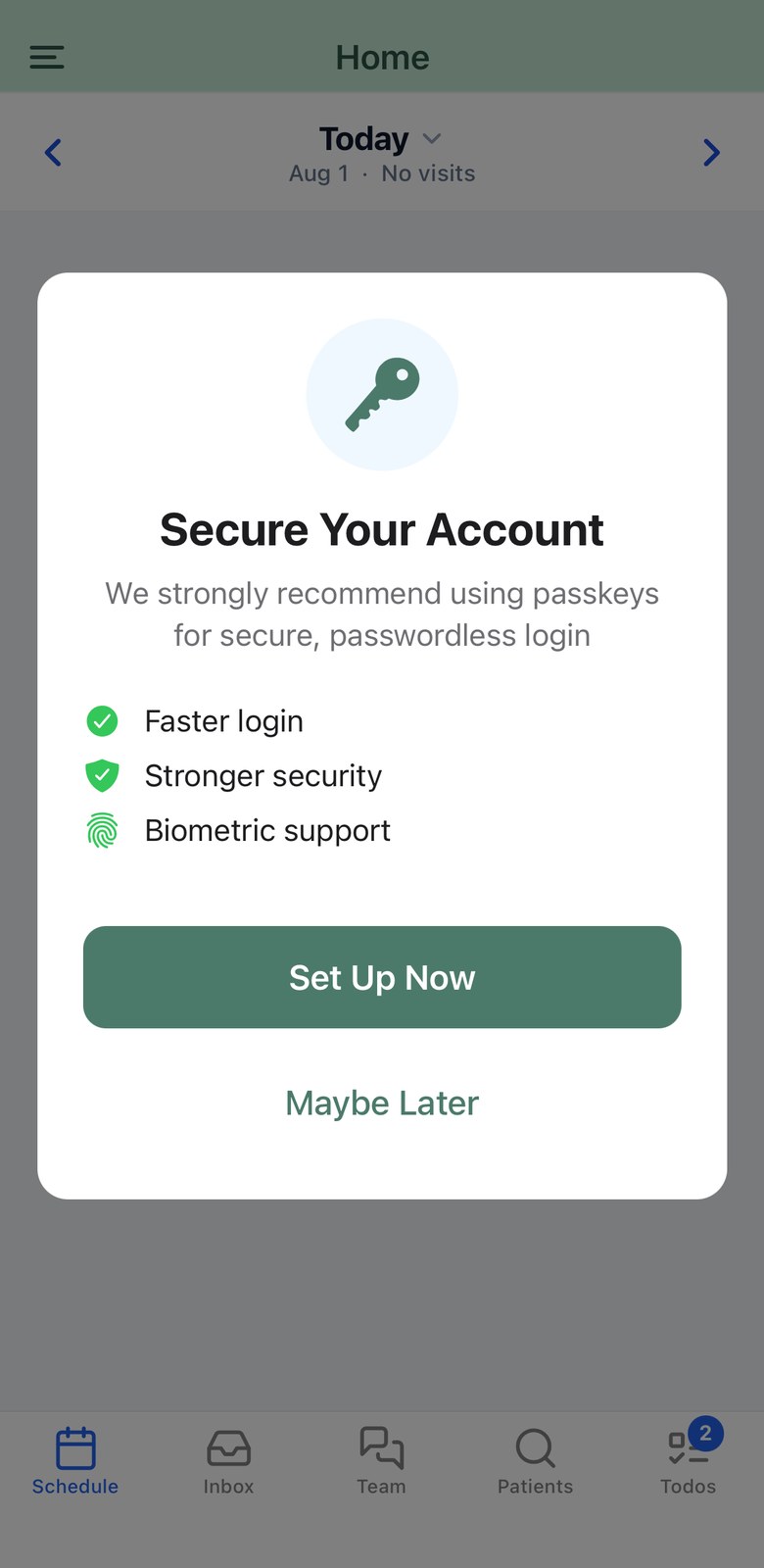
The passkey prompt in the app: faster login, stronger security, biometric support, with Set Up Now and Maybe Later

Offered, not forced

After the first sign-in the app offers a passkey rather than demanding one, so a practice can roll them out at its own pace — and a clinician who declines still gets two-factor by SMS.

Then it's one tap

From then on sign-in is Face ID, Touch ID or the device passcode. The credential is held in the phone's secure hardware, scoped to Hero, and cannot be replayed from anywhere else.

Hero EMR operates as a business associate under a signed BAA with every practice, and the app is built around that posture: server-dictated HTTPS origins, short-lived session tokens, per-organization scoping on every request, and an explicit acknowledgement before any feature copies patient detail to a third-party service. Compliance is a property of your practice's whole environment, not a badge on an app — talk to us about how Hero fits yours. Read the documentation →

For patients

Their record, their care team, their devices.

The same app your patients download becomes their portal — appointments, messages, results, bills, and the health data their phone and cuff are already collecting.

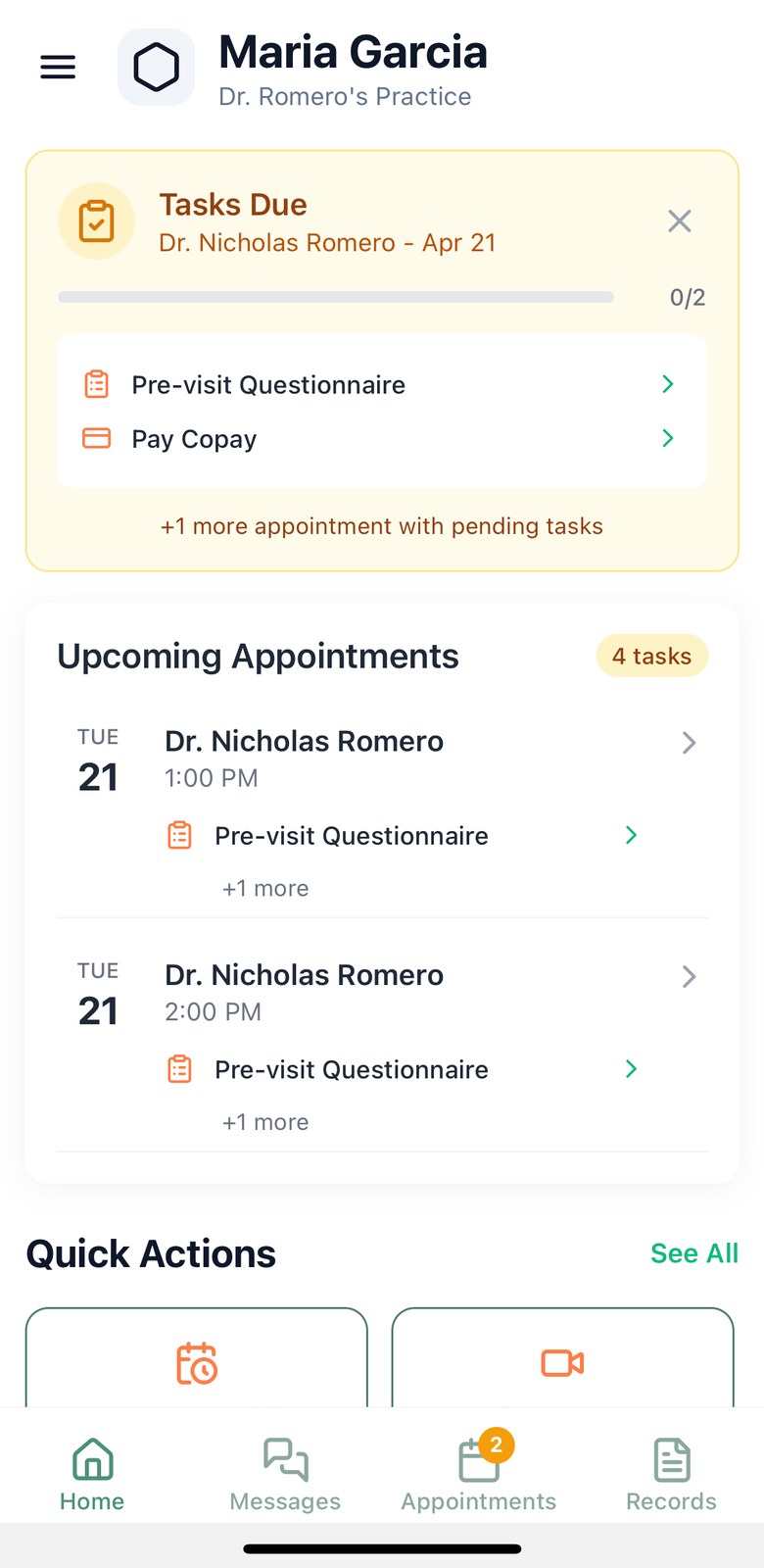
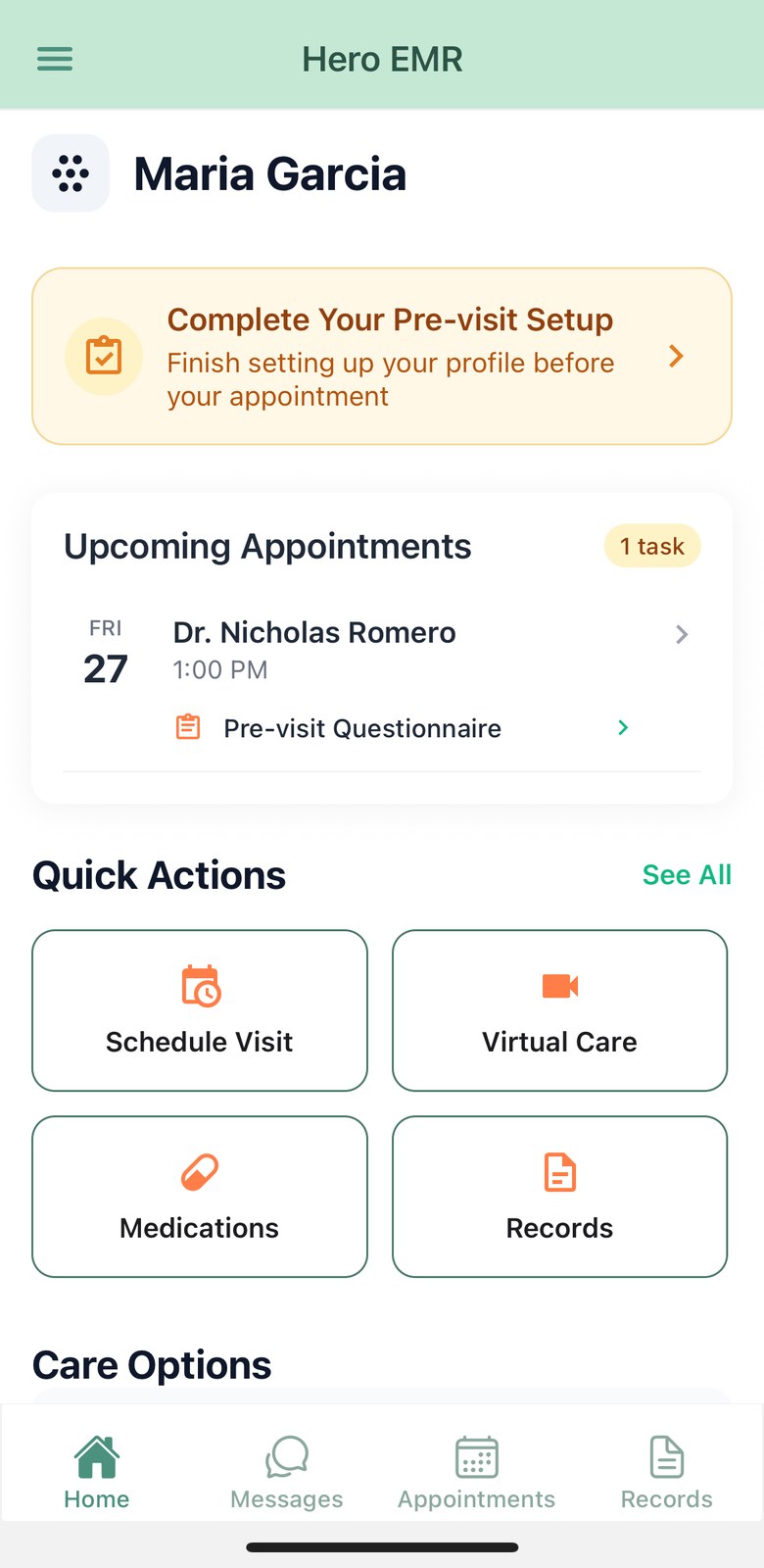
Patient home screen showing outstanding pre-visit tasks and the next two appointments

Everything they'd otherwise call the front desk about

The home screen leads with what's next: the upcoming visit, the pre-visit tasks still outstanding, and a way to check in. Patients who can answer their own questions at 9pm don't ring your phone at 9am.

  • Book, reschedule, cancel, and check in — plus a waitlist that offers them an earlier slot when one opens.
  • Join a virtual visit straight into Zoom, inside the join window.
  • Secure messages with attachments, and drafts that survive a closed app.
  • Pay a balance with a saved card, Apple Pay or Google Pay — a payment link opens the app on the right charge.

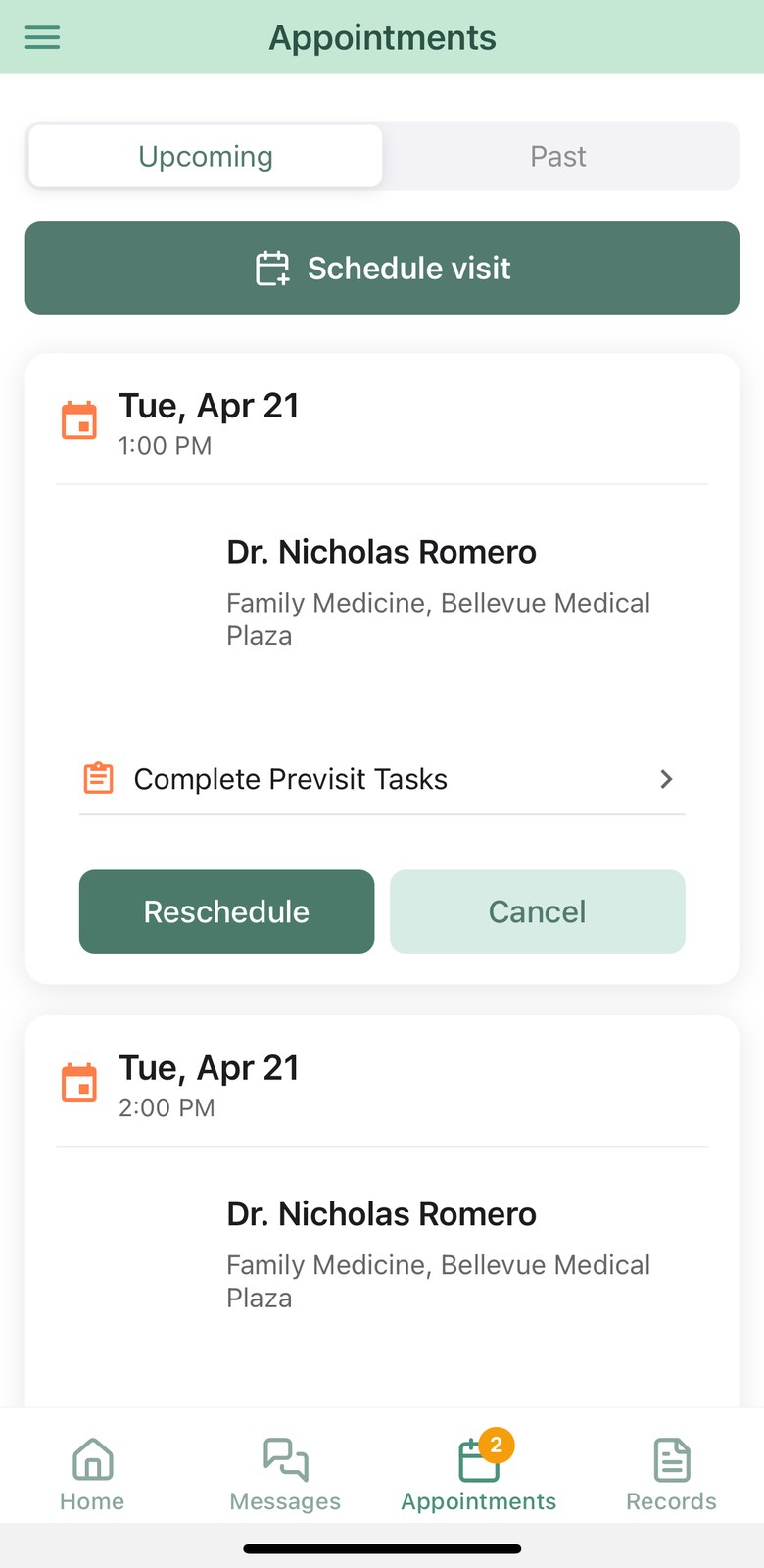
Upcoming, past, and what still needs doing

Appointments carry their own pre-visit work, so the questionnaire and the copay stop being something your front desk has to chase.

  • Provider, specialty and location on every card — reschedule or cancel in two taps.
  • Complete previsit tasks sits on the appointment itself, with a badge counting what is left.
  • Check in from the phone inside your window; join a virtual visit straight into Zoom.

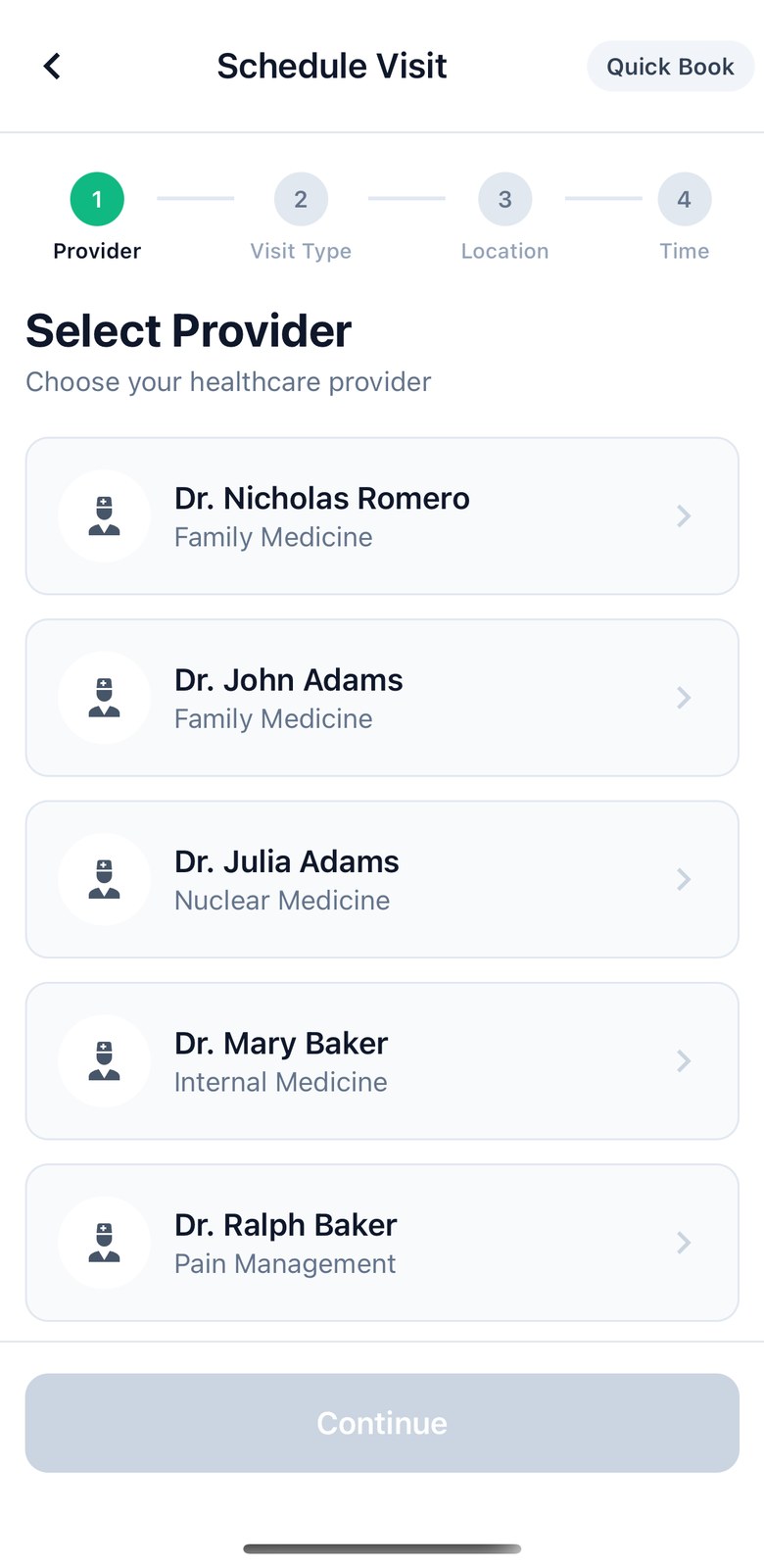
Booking that doesn't need a phone call

Four steps — provider, visit type, location, time — with a quick-book shortcut for patients who just want the next opening.

  • Only the providers and visit types you have made bookable appear.
  • “Next available” searches across every provider the patient sees at once.
  • Waitlist opt-in at the point of booking, then a claimable offer when something opens.

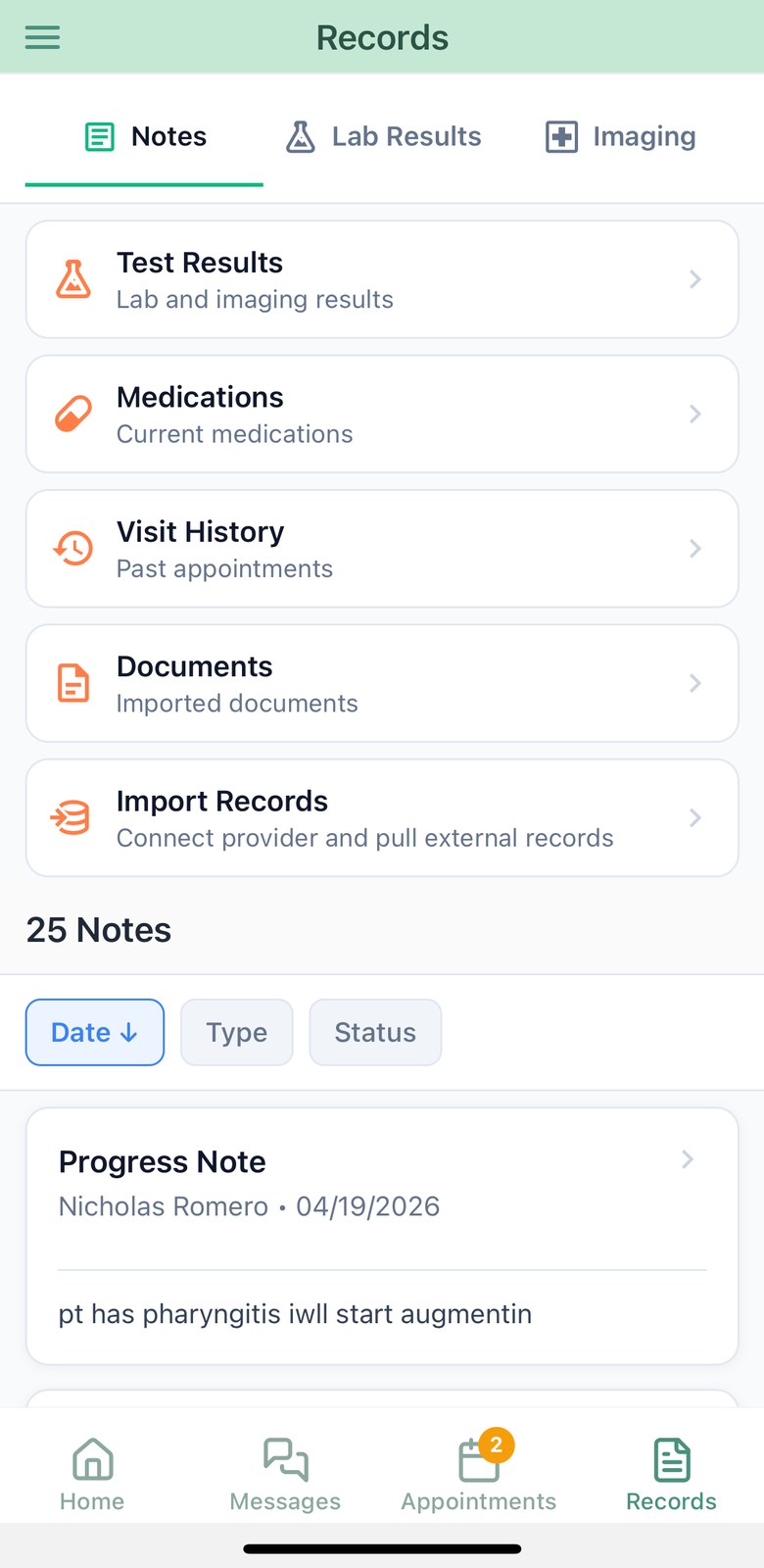
The record, in language they can use

Notes, labs and imaging in one place — filterable, with the hub cards that lead to test results, medications, visit history and documents.

  • Labs carry reference ranges, abnormal flags and a trend across dates.
  • Imaging reports split into technique, findings and impression.
  • Import records pulls demographics, medications, allergies and notes from a previous health system.

Bills that get paid, cover that stays current

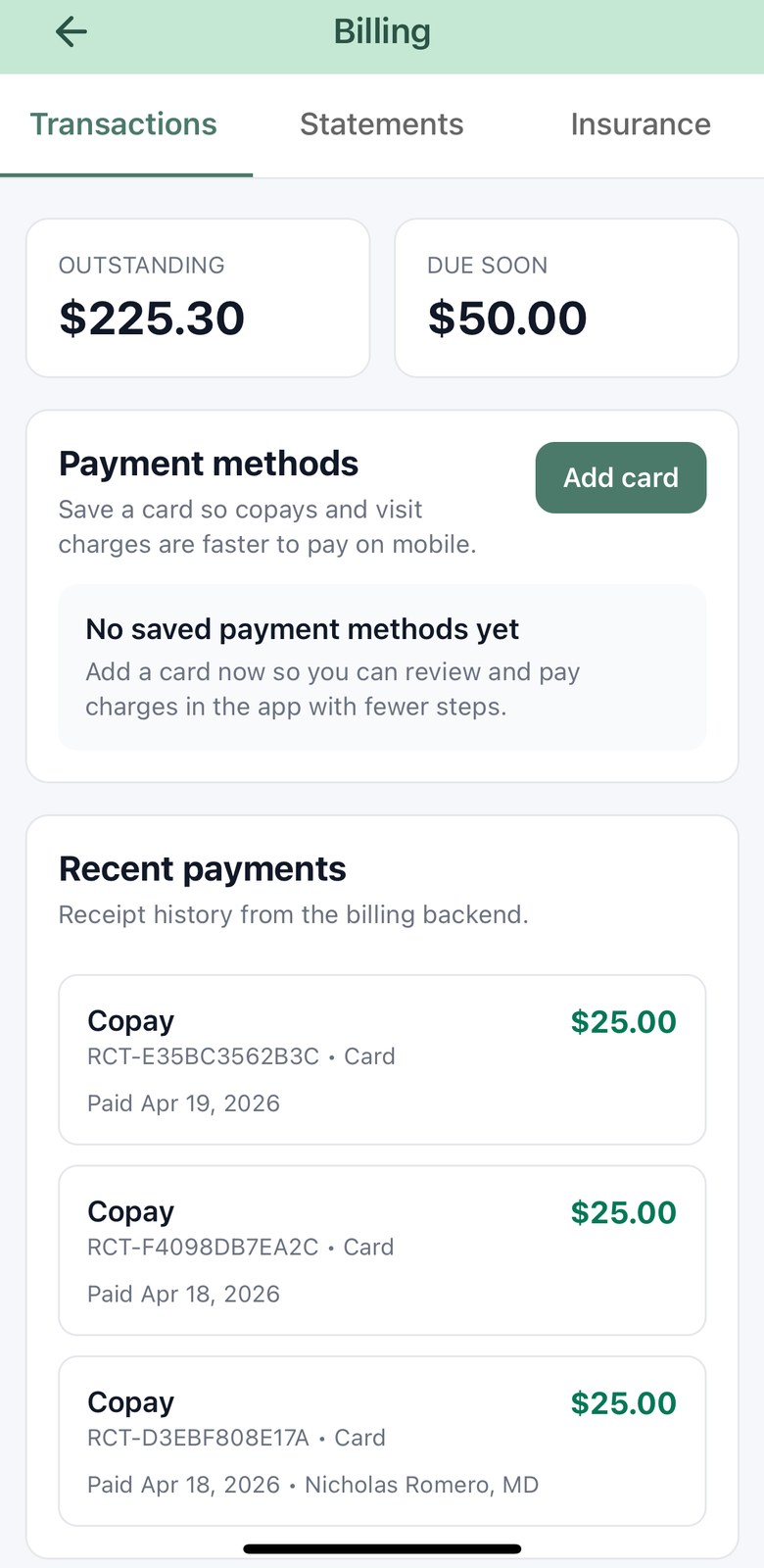
Balance, charges and receipts in one screen — and an insurance card the patient can update by pointing a camera at it.

  • Outstanding and due-soon totals up top; receipts and statements underneath.
  • Pay with a saved card, Apple Pay or Google Pay — retries can’t double-charge.
  • Scanning an insurance card reads the member ID, group, plan and copays off it.

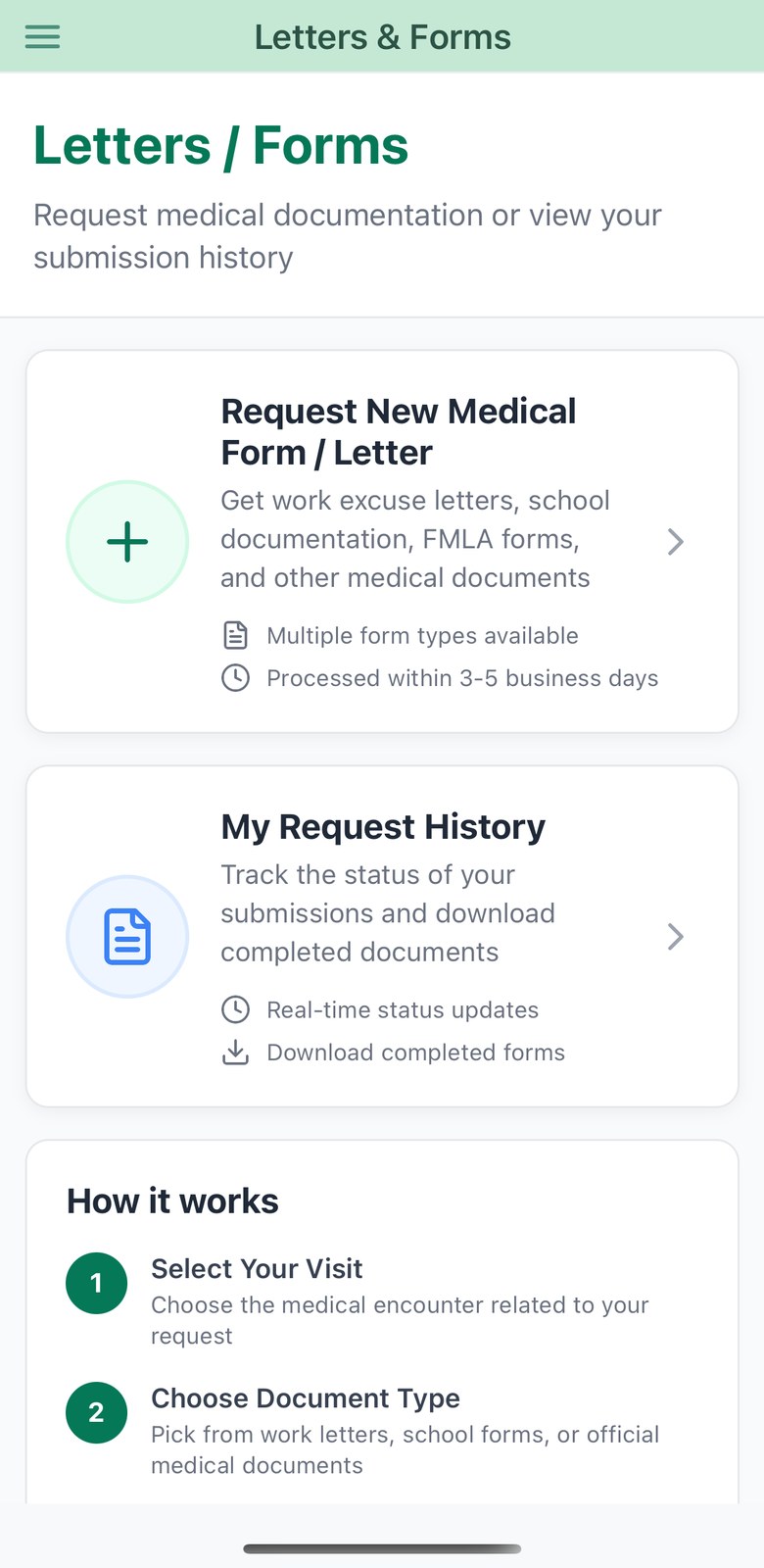
Letters and forms, requested and tracked

Work notes, school letters, your own template catalogue — or a PDF the patient uploads for you to complete.

  • Requests are tied to a specific visit, so you know what is being attested to.
  • Status runs from submitted through to a downloadable file, with your notes if it needs changing.
  • Assigned pre-visit paperwork is signed on the glass and comes back structured.
Patient appointments list with upcoming visits, previsit tasks and reschedule controls
Patient booking wizard, step one: choosing a provider
Patient records screen with notes, labs and imaging plus hub cards
Patient billing screen showing outstanding balance, payment methods and receipts
Letters and forms screen with a new request card and request history

Remote patient monitoring

Vitals flow into the chart from the patient's own devices — blood pressure, heart rate, weight, glucose, oxygen saturation, sleep, activity and more — with 7-day charts and a full history the patient can see for themselves.

Enabled per practice

Apple Health, one way only

With permission, Hero reads 14 data types from Apple Health — and never writes back. The first connection brings 30 days of history; after that it tops up quietly while the app is open.

iPhone

Bluetooth blood-pressure cuffs

Pair a cuff once and readings arrive on their own — systolic, diastolic, pulse, and the irregular-heartbeat flag the device raises. Hero speaks the standard Bluetooth blood-pressure profile, so it isn't tied to one brand.

iPhone & Android

Readings survive a bad signal

A measurement taken in a basement isn't a measurement lost. Readings queue on the device, de-duplicate, and upload when signal returns — with the patient able to see exactly what's pending.

A conversation before the visit

Patients answer a guided pre-visit questionnaire and walk through their medication list in plain language. You get a structured summary — and an urgency flag if something in the answers warrants it.

Point the camera at the paperwork

Photograph an insurance card and the member ID, group, plan and copays are read off it. Photograph a medication bottle — or a whole printed list — and the medications come back structured, ready to confirm.

Bring records from elsewhere

Patients connect to their previous health system — searching by name, or finding nearby providers by location — and import demographics, medications, allergies and notes, confirming what lands in their chart.

Epic · MyChart

Results they can actually read

Labs with reference ranges, abnormal flags and trends over time. Imaging reports split into technique, findings and impression. Notes, visit history and documents, all in one place.

Forms, letters and paperwork

Request a work or school letter against a specific visit, complete assigned pre-visit paperwork with a signature on the glass, and track every request through to a downloadable PDF.
Everything in the app

One download, two experiences. What each person sees is decided by who they are and what your practice has turned on.

Physician & staff

Signed in with a clinical account

Schedule

  • Day agenda with encounter-aware status
  • Month view with per-location availability
  • Two-way Google Calendar & Outlook sync
  • Practice-timezone dates everywhere

Encounters

  • Full note editor from the schedule row
  • Ambient visit recording, background-safe
  • Literal dictation into the note
  • Live Activity & Dynamic Island (iPhone)
  • Recoverable sessions after an interruption
  • Sign, or start an addendum

Inbox & messaging

  • Patient, results, refills, forms, staff, referrals, fax, inquiries
  • Approve or deny refills with reason codes
  • Link a fax to a patient; forward a thread
  • Care team chat with urgent banners
  • Save a conversation into the chart

Patients & prescribing

  • Chart review: notes, labs, imaging, medications
  • Prescribing with sig builder and diagnosis search
  • EPCS approval and controlled-substance signing
  • Photograph documents into the chart
  • Recent patients, shared with the browser

Running the practice

  • Shared todo list with delegation and snooze
  • Kiosk mode for check-in and card-present copays
  • Passkey and two-factor sign-in

Patients

Signed in with a portal account

Appointments

  • Book, reschedule, cancel, check in
  • Next-available search across their physicians
  • Waitlist offers with a claim countdown
  • Join a virtual visit
  • Pre-visit task list with progress

Health data

  • Apple Health sync, read-only (iPhone)
  • Bluetooth blood-pressure cuffs
  • Vitals charts, trends and history
  • Offline queueing with retry
  • APCM care plan checklist

Records

  • Notes, labs with trends, imaging reports
  • Visit history and documents
  • Import records from Epic / MyChart
  • Medications, allergies, preferred pharmacy
  • Refill requests with eligibility

Admin

  • Balance, charges, receipts, statements
  • Card, Apple Pay, Google Pay
  • Insurance cards, scanned by camera
  • Letters & forms requests
  • Guarantor and communication preferences

Account

  • Google, Apple, password or passkey sign-in
  • Two-step verification by email or SMS
  • Trusted devices, per practice
  • Multi-practice accounts

Put the practice in your pocket.

My Hero is free on the App Store and Google Play, and included with every Hero EMR practice. Your patients get the portal in the same download.