Drug inventory
An optional second switch: receive drugs by scan, follow every lot and open vial, let each dose take itself off the shelf, reorder before you run out, count and recall, and see what the drugs cost against what they bring in.
Drug inventory
An optional second switch: receive drugs by scan, follow every lot and open vial, let each dose take itself off the shelf, reorder before you run out, count and recall, and see what the drugs cost against what they bring in.
Drug inventory: turn it on
Drug inventory tracks the drugs you keep on the shelf: what you received, from which lot, when each lot expires, which multi-dose vials are open, what each dose used, what was thrown away, and what it all cost. It is optional and builds on In-office medications: a dose given from stock takes itself off the shelf.
-
Switch it on.
In
Admin>Additional Features, turn on Drug inventory and clickSave Changes. It ships off and needs In-office medications, which it switches on with it. -
Open
Inventoryon the toolbar. The button appears for people who can see stock or its reports (hide or move it under Customize your toolbar). TheDrug inventoryworkspace has seven tabs:Stock,Receive,Orders,Counts,Alerts,ReportsandItems. A practice with more than one location gets aLocationswitcher at the top. - Set up in this order. Add your items and suppliers, link each protocol to its stock item, then receive what is on the shelf today.
Who sees what
| Permission | What it allows | Role profiles that include it |
|---|---|---|
| View drug stock, lots, orders and inventory alerts | Every tab except Receive, read only; acknowledging alerts; discarding an open vial. | Medical Assistant, Nurse, Office Manager |
| Receive drug stock, record counts, adjustments and disposals, and manage suppliers and purchase orders | Receive and every change to stock, items, suppliers, orders and counts; putting a never-given dose back on the shelf. | Nurse, Office Manager |
| See drug costs, inventory value and injection revenue and margins | Cost and value columns, the Inventory value and Injection revenue and margin reports, and Supplies per dose on protocols. | Office Manager, Billing Manager |
Practice administrators have all three. Someone with only the cost permission, such as a billing manager, sees just the Reports tab. Without the cost permission, money shows as “—”. Choosing a lot while giving a dose needs none of these: anyone who can record doses sees the lots.
Items and suppliers
Items is “Every drug the practice keeps in stock.” Click Add item and search the drug by name or NDC (your protocols and the FDA directory). A directory product then shows Package you buy, its package sizes listed like 1.5 mL prefilled syringe · NDC 50458-0564-01; choosing one “Fills the NDC, package type and amounts below”: the package NDC, package type, counting unit, volume, drug per unit and units in one package, wherever the package states them. A product with a single package has it chosen already. Check the details it fills in:
| Field | What it means |
|---|---|
Name, Generic name | What staff see in lists and the lot picker. |
Package NDC, Other NDCs accepted | The NDC on the box you buy, and any other package NDCs that are the same product. |
Package type | Single-dose, single-use package (kit), multi-dose vial, tablet or capsule, or other. |
Counted in | The unit you count on the shelf: syringe, vial, kit, container, device, mL, tablet, capsule or patch. Multi-dose vials are always counted in mL, so each dose takes off what was drawn up. |
Drug in one …, Volume of one … (mL) | For example 234 mg in a 1.5 mL syringe. |
… in one package / mL in one package | How many units come in a package, so receiving by the package multiplies correctly. A multi-dose item is counted in mL, so it asks for “All the mL one package holds: a 10 mL vial is 10, a tray of 25 × 1 mL vials is 25. Receiving a package adds this many mL.” |
Storage | Room temperature, Refrigerated or Frozen. |
Discard opened vials after (days) | Empty uses the practice default (28 days after the first puncture). A different number needs the Manufacturer’s instruction, for example “Package insert, section 16.2”. |
Controlled schedule | Comes from the FDA directory and can’t be lowered or removed here. Controlled drugs need a witness for waste and counts. |
Usual supplier, Reorder defaults | Reorder point, Usual order size and Full-stock level, used for reorder suggestions (each location can override them). |
Last cost paid | Per unit, for people who can see drug costs; Cost unknown until a receipt has a cost. |
Then open each protocol in Admin > In-office medications and set its Stock item, so doses draw from that item’s lots. Show inactive items lists items you no longer stock.
Suppliers
Below the items, Suppliers is “Where the practice buys its drugs. Used on purchase orders.” Add supplier takes the Name, Account number, Contact, Phone, Email, Ordering website and Notes.
Receive stock
Receive puts a delivery on the shelf: “Scan each box, or add a line by hand. Each line is one lot.” Stock goes into the location shown at the top.
-
Tie it to an order, if there is one.
Choose the
Purchase order(or clickReceiveon the order itself), thenFill in from …to start from what is still to come. Each line can name itsOrder line. -
Scan each box.
Point the scanner at the box. Hero fills the item (by NDC), the NDC, the lot and the expiration. Scanning another box of the same lot adds a package to that line (“Added another package of lot …”). An NDC the FDA directory doesn’t list can still be recognized from RxNorm, the national drug vocabulary. A product you don’t stock yet says so with its package size, e.g. “Invega Sustenna (1.5 mL prefilled syringe) isn’t stocked yet. Add it as a new item.”;
Add “…” as a new itemopens the item editor with that package’s details already filled. -
Check each line.
Item,NDC on the box(choose from the list when one barcode matches more than one NDC),Lot, andExpires(MM/YYYY or MM/DD/YYYY; Hero shows Good through …). When the barcode didn’t clearly separate the lot from the expiration, tickThe lot and expiration match the boxafter checking them. -
Enter the quantity and cost.
Quantityin packages or in the item’s counting unit (Hero shows the total, e.g. = 2 syringes, or the mL for a multi-dose item). The cost is per package or per unit, and its label follows the item (Cost per package,Cost per syringe); it comes “From the invoice. Leave empty if you don’t know it.” An unknown cost stays unknown and is never counted as $0; on an order line, leaving it empty uses the order’s price. -
Say whose stock it is.
Practice stock,Sample, orA patient’s own medicationwithFind patient. A sample can be given but is never billed as drug; a patient’s own lot is offered only when giving to that patient. -
Click
Receive(it readsReceive 3 lots, and so on). The Received box lists each lot with its new on-hand count. If any line can’t be saved, nothing is.
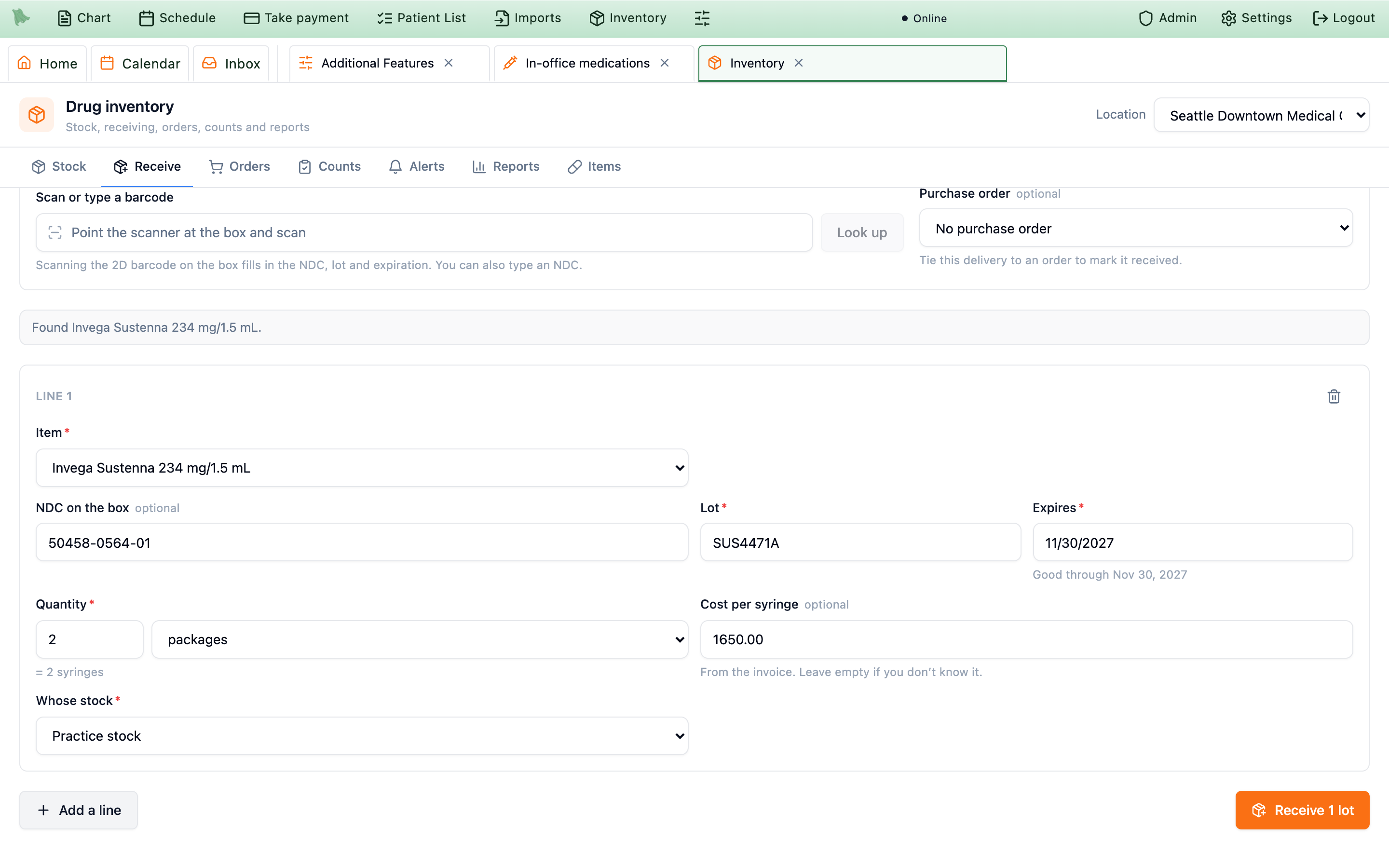
Each receipt keeps its own cost. A lot’s cost per unit is the average of what you paid for it, weighted by quantity, and each dose records the cost at the time it was given.
Stock, lots and open vials
Stock is “What’s on the shelf” at the location: one row per item with On hand, Usable, On order, Reorder at, Status (In stock, Low, Out or Below zero) and, for cost viewers, Value. Chips flag a controlled drug and any open vials past their discard date. Search by item, NDC or lot, or tick Only items that need attention.
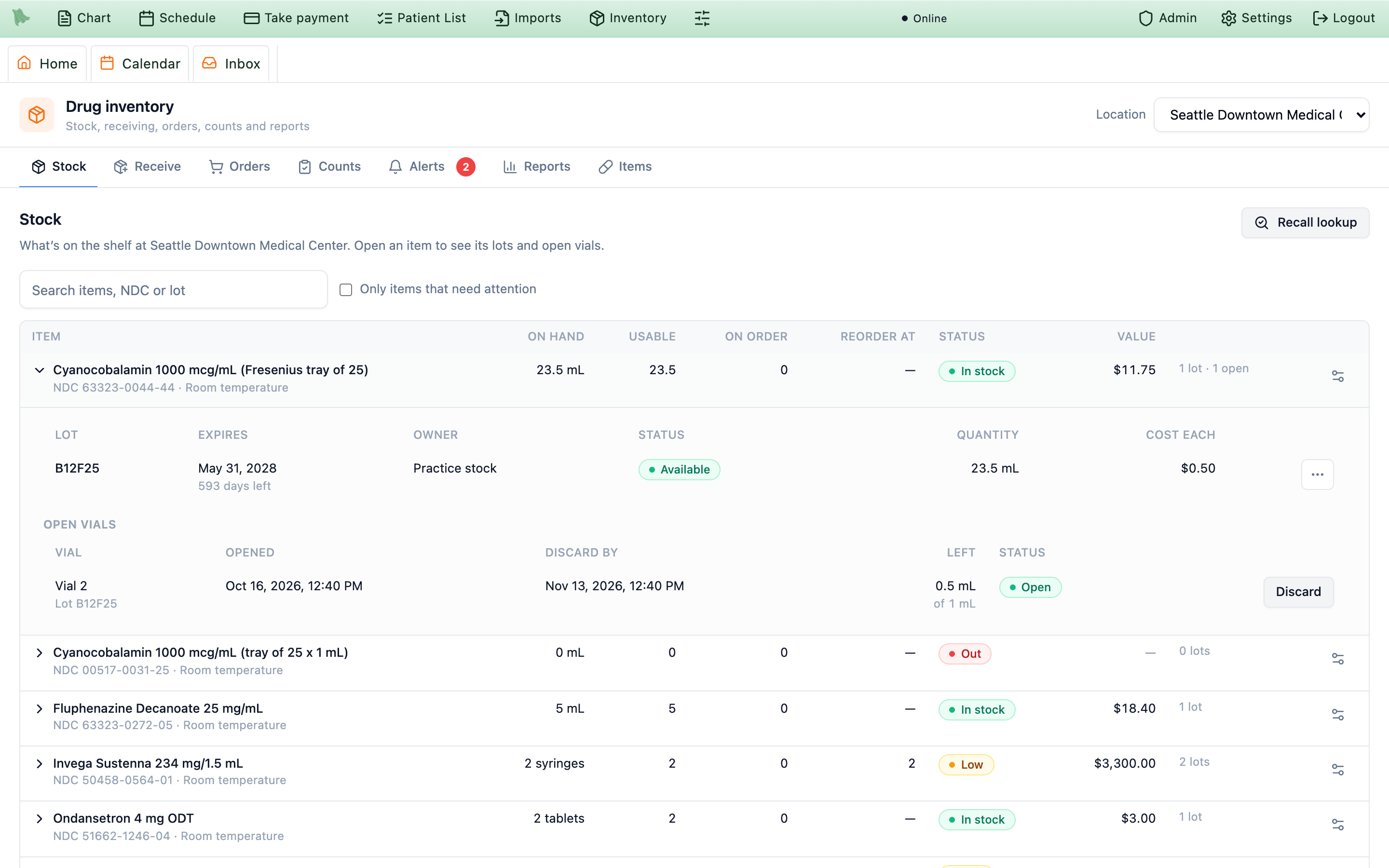
Usable is what you can actually give: on hand, minus expired lots, lots that expire before a new order would arrive (Supplier lead time in Settings, 14 days by default), patients’ own supply, and quarantined or recalled lots. Reorder suggestions and low-stock alerts use it.
Lots
Open an item to see its lots: Lot, Expires (with the days left), Owner (Practice stock, Sample, or Patient’s own with the patient’s name), Status (Available, Quarantined, Recalled, Used up, Disposed), Quantity and, for cost viewers, Cost each. Each lot’s menu holds:
| Action | Use it to |
|---|---|
History | See the lot’s receipts and Every movement: what, when, the change, the balance after, who and any witness. |
Quarantine / Release from quarantine | Hold a lot you’re unsure of. A quarantined lot can’t be given until it’s released. |
Adjust quantity | Correct the count, with a reason (“Use a minus sign to take stock off, for example -1.”). A controlled drug needs a witness. |
Dispose | Throw away expired or damaged stock (Expired, Damaged or contaminated). Not offered for controlled drugs. |
Send to reverse distributor | The only way controlled stock leaves: record the Reverse distributor, Their DEA registration number and the Form or reference number (e.g. the DEA Form 222 or the pickup reference). Hero records the transfer; it has no on-site destruction workflow. |
Return to supplier | Send stock back, with the return authorization or reference. |
Move to another location | Transfer stock between your locations in one step. |
The gear on an item’s row opens Reorder settings for this location: Reorder point (“Suggest an order at or below this many.”), Usual order size and Full-stock level (“Orders top stock back up to this many.”).
Open vials
Multi-dose vials that have been punctured are listed under Open vials: the vial and lot, when it was Opened, Discard by, the mL Left, and its status (Open, Past discard date, Empty, Expired, Discarded). Discard by is 28 days after the first puncture at the same clock time, even across a daylight-saving change, or the item’s manufacturer rule, and never later than the lot’s expiration. Discard opens Discard this vial with a Reason (and a Witness for a controlled drug); what was left in it is recorded as waste. Anyone who can view stock can discard a vial.
Recall lookup
-
Click
Recall lookupand enter theLot numberand theNDC or product codefrom the recall notice, thenLook up. - Read both lists. On the shelf shows every holding of that lot at every location and owner. Patients who received it lists every documented dose from that lot, including doses recorded before Drug inventory was turned on.
-
Click
Mark as recalledwith theRecall notice or reference. “Marking the lot recalled blocks it everywhere: every location, practice stock, samples and patients’ own supply.”
Giving a dose from stock
With Drug inventory on, the Lot and expiration part of Give medication starts with From stock: the lots of that product, earliest expiration first, each as Lot …, exp …, 3 on hand. A sample says (sample), and a patient’s own lot appears only for that patient, marked (brought by this patient). Expired, recalled and on-hold lots are listed but can’t be picked. The lot you choose fills in the lot number, expiration and NDC, and decides whether the dose is practice stock, a sample or the patient’s own.
- Scan to pick. Scanning the box picks the lot when exactly one lot on hand matches; otherwise the matching lots are listed first.
- What comes off the shelf. A single-dose syringe, vial or kit: the packages used, including what was thrown away. A tablet: the count. A multi-dose vial: the mL drawn.
- Multi-dose vials. Choose
Use open vial(opened …, use by …, 6.5 mL left) orOpen a new vial, which asks when it wasFirst punctured(the real time, which starts the discard clock) and theVial size (mL). The size is filled in from the lot’s package (“One vial of this lot’s package.”, so 1 mL from a tray of 25 × 1 mL vials); left empty, Hero uses the stock item’s package size. Then enter themL drawn. A vial past its use-by time can’t be used: discard it. - No stock on record. “No stock on record here. Type the lot below.” A lot typed by hand is documented on the dose but not taken from stock. When a dose takes more than a lot has on record, it still saves and the count goes below zero with an alert, unless the practice turned off
Allow a dose to be saved when no stock is on record. - Removing a dose. The drug stays used unless the dose was never given and you put it back on the shelf. A dose first recorded on the wrong chart is recorded again with
Use stock already recorded from voided entry, so it isn’t taken twice; see Correct, amend or remove a record.
Reorder suggestions and purchase orders
Orders starts with Reorder suggestions: “Items at … whose usable stock plus what’s on order is at or below the reorder point.” Each suggestion shows Usable, On order, Reorder at, the suggested Order in whole packages (enough to reach the full-stock level, and at least the usual order size) and the Supplier. A line such as 3 patients due in the next 30 days use this item is there for information; it doesn’t change the amount.
-
Tick what to order and click
Create purchase orders. Hero makes one draft per supplier: “Review each draft, then mark it ordered once you’ve placed it with the supplier.”New orderstarts one by hand, with theSupplier,Expected by, each item’sPackagesandCost / package, andNotes. -
Place the order with your supplier, then click
Mark as ordered.PrintandDownload CSVgive you a copy to send. -
When it arrives, click
Receiveon the order. It opens the Receive tab filled in with what is still to come (see 24.18). A partial delivery leaves the orderPartly received.
Orders move through Draft, Ordered, Partly received, Received and Cancelled. Cancel order is offered only until anything has been received.
Counts
Counts: “Count what’s on the shelf and post the differences. Controlled substance counts keep a witness and the time of day.”
-
Click
Start a countand choose what to count.Cycle count(“A few items you choose.”),Full count(“Every lot at this location.”) orControlled substance count(“Every controlled drug at this location, with a witness.”). A controlled count also asks theTime of day(Opening of businessorClose of business), theRegistrant DEA numberthe stock is held under, and theWitness. -
Decide on a
Blind count. It hides the expected quantity until each lot is counted, so the count isn’t influenced by it. -
Count each lot.
Enter what you find under
Counted(0 if none). Hero shows theExpectedamount and theDifference, with an optional reason. Each lot is compared with its stock at the moment you counted it, so a dose given while the count is open isn’t counted against you. -
Finish.
Finish countasks Post 2 corrections and finish? (or Everything matches. Finish the count?). Corrections go into each lot’s history.Cancel countposts nothing.
Controlled substance log report works the same way.Alerts
Alerts is “Stock that needs attention.” Hero checks stock every hour, and a count on the tab shows how many are open.
| Alert | Raised when |
|---|---|
Low stock / Out of stock | Usable stock is at or below the reorder point, or none is left. |
Expiring soon | A lot expires within Warn when a lot expires within (days) (60 by default). |
Expired on the shelf | An expired lot still has stock. |
Open vial past its discard date | An open multi-dose vial reached its discard-by time. |
Stock below zero | A dose took more than was on record. |
Recalled lot on the shelf | A recalled lot still has stock somewhere. |
Expired product given | A dose was documented as given after its lot’s expiration. |
An alert clears on its own when the problem is fixed. Acknowledge hides it until it gets worse (“It comes back only if it gets worse.”). Show Open, Acknowledged, or Open and acknowledged, and tick All locations to see every location at once. Anyone who can view stock can acknowledge.
Two options in Admin > In-office medications > Settings > Drug inventory, both off by default: Make to-dos for inventory alerts (for the people who manage stock), and Send a daily email of inventory alerts, a short summary with no patient information.
Reports and drug costs
Choose a report from the list on the left of Reports. Reports run on your practice’s calendar days, from the first of this month to today unless you change From and To. Choose a Location or all of them, and download any report as CSV or Excel. Reports live in the Inventory workspace, so they need Drug inventory on.
| Report | What it shows | Needs the cost permission |
|---|---|---|
Administration log | Every medication given or not given in clinic: patient, drug, NDC, lot, expiration, dose, route, site, who gave it, the supervising provider, waste and the billing choice. | No |
Injection revenue and margin | Billed, allowed, insurance paid, patient responsibility, drug and supply cost, and estimated margin; Show it for Each dose, By drug, By payer or By month. | Yes |
Inventory value | What’s on the shelf now, valued at what you paid for each lot. Stock whose cost isn’t known is listed separately, never counted as $0. | Yes |
Usage, waste and loss | Per item and month: given, wasted at the time of the dose, disposed, expired, and count differences. Dollar amounts only for cost viewers. | No |
Controlled substance log | Every movement of each controlled drug with its schedule, the patient for doses given, quantity, balance after, who did it and the witness. A record aid, not a DEA filing. | No |
Medications due | Patients whose repeating medications are due soon, due now or overdue. | No |
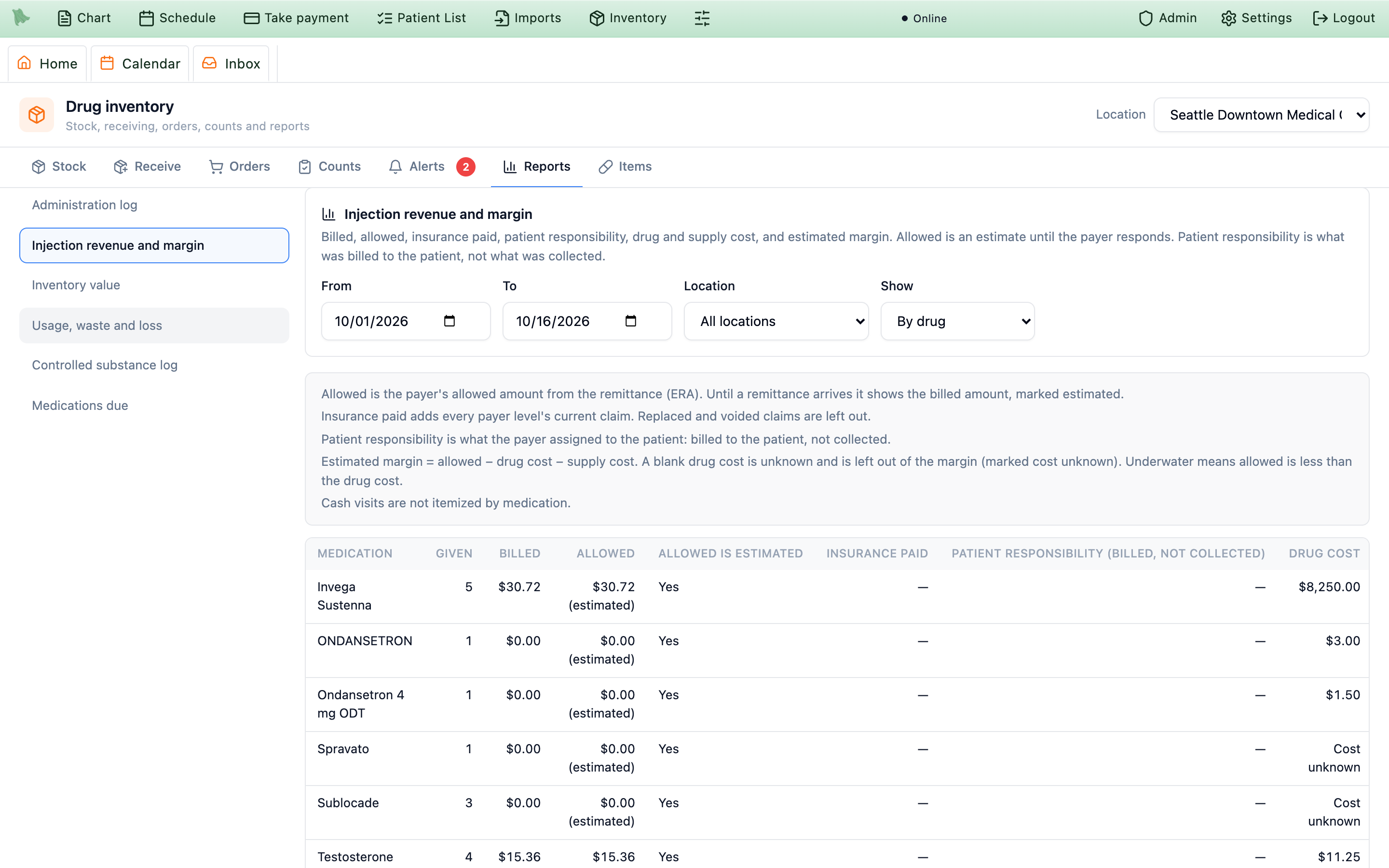
Reading the revenue and margin report
- Drug cost is the lot’s cost per unit when the dose was given, times what the dose used. Supply cost is the protocol’s
Supplies per dose. - Allowed comes from the payer’s remittance (ERA). Until one arrives it shows the billed amount, marked
Allowed is estimated. - Insurance paid adds every payer level’s current claim; replaced and voided claims are left out.
- Patient responsibility (billed, not collected) is what the payer assigned to the patient, not what the patient paid.
- Estimated margin = allowed − drug cost − supply cost. A blank drug cost is unknown: it is left out of the margin and the row is marked
Cost unknown.Underwatermeans allowed is less than the drug cost. - Cash visits are listed as cash visit, not itemized.
The report doesn’t yet include what patients actually paid you, so treat the margin as an estimate. Reports that list patients are recorded in the access log.
Need help? Email support@heroemr.com.