Dot phrase reference
Every dot phrase that ships with Hero EMR, what it inserts and where it works: the note modules, pickers, chart phrases, specialty phrases, per-patient phrases and Smart Blocks, the tokens for writing your own, and how to share and replace them.
Dot phrase reference
Every dot phrase that ships with Hero EMR, what it inserts and where it works: the note modules, pickers, chart phrases, specialty phrases, per-patient phrases and Smart Blocks, the tokens for writing your own, and how to share and replace them.
Type a period, pick a phrase
A dot phrase (dotphrase) is a shortcut that starts with a period. Type . in the note and a list opens; keep typing to narrow it (.hp finds .hpi), then press Enter or Tab to insert. Every phrase does one of four things:
| Kind | What happens | Examples |
|---|---|---|
| Text phrase | Inserts written text: a section heading, prompts, *** blanks and dropdowns, often with chart data already filled in. | .soap, .hpi, .exam, .prenatal |
| Chart phrase (Auto-filled) | Inserts a value from the chart at that moment: a name, a date, the problem list, vitals, a questionnaire score. | .name, .today, .diagall, .lastvitals, .phq9 |
| Picker | Opens a search box instead of inserting text; what you choose goes into the note as a card. | .hero, .lab, .imaging, .diags |
| Smart Block | Inserts an interactive form that you fill by keyboard, mouse or dictation and that prints as note text. | .colonoscopy, .egd, .awv, .pt |
Blanks and dropdowns. *** is a blank to fill and {{A|B}} is a dropdown that starts on its first choice. Press F2 to jump to the next blank or dropdown and Shift+F2 to go back. Hero's own templates always put the neutral choice first (“Not addressed”, “Not examined”, “—”), so nothing is attested until you choose it.
Options. Many chart phrases take an option in square brackets, typed with no space: .age[written], .lastvitals[3], .visitbp[first], .ga[long]. A space closes the list.
Any capitals. Phrase names work however you capitalize them: .Age, .LastVisit and @Age@ fill in the same as .age, .lastvisit and @age@.
The visit’s date. Date phrases and “this visit” phrases use the visit’s date (the appointment date, else the day the encounter was opened) in the practice’s time zone, so charting early or late still stamps the visit day. With no visit open they use today.
Permissions. A chart phrase only inserts what you are allowed to see. Without the right access it inserts nothing, never an error, so a note does not reveal that hidden data exists.
| Where you can type a dot phrase | What works there |
|---|---|
| The note (Note Writer) | Everything on this page: text and chart phrases, pickers, Smart Blocks, per-patient phrases, F2. |
| Patient Instructions and the letter composer | The same editor as the note, pickers and .hero included. |
| Free-text fields inside a Smart Block | Text and chart phrases and F2; pickers and .datepicker do not open there. |
| Quick note, the Create Orders clinical note, the prescription note | Text and chart phrases; questionnaire phrases insert cards in a quick note. |
| Refill Center notes and quick messages | Your own and practice phrases, filled with the refill’s details (Refill Center). |
| Co-sign statement | Chosen from a list of your phrases and Hero’s, not typed; the text stays editable. |
| Visit types → Starter text | A phrase mapped to a visit type is inserted into an empty note of that type. |
| DICOM dashboard report box | The .xr_ X-ray templates (6.39) plus your phrases. |
Inbox replies and Visit notes when booking | Your own and practice phrases, plus chart phrases for the thread’s or the booking’s patient. In the one-line Visit notes box a phrase goes in on one line. |
| Every other text box: website inquiry replies, Forms & Letters requests and form instructions, the fields of a PDF form, and notes and reasons such as stopping a medication or a refund | Your own and practice phrases. The list opens only when a phrase matches, so Enter otherwise does what it always does there; Ctrl/Cmd+Z takes a phrase back out. Chart phrases are offered only where the box belongs to a patient’s chart (the chart, a visit, Forms & Letters), never in a website inquiry. Pickers, Smart Blocks and visit-only phrases do not open here. Phrase, template and AI prompt editors keep a typed .shortcut as plain text. |
Settings → Dot Phrases lists your phrases, your practice’s, and Hero’s built-in ones (chart phrases carry an “Auto-filled” chip). Press F8 in the note for the Note Writer guide and its Shortcuts tab.Build a note from Hero’s note modules
Every practice has these built-in text phrases. Each is a module of a standard E/M-focused note; .soap inserts the whole set and the others insert one part. Modules marked “from the chart” fill that list at the moment you insert them, with a reconciliation dropdown so the note says whether you reviewed it.
| Shortcut | What it inserts |
|---|---|
.soap | A full modular SOAP note: .subjective, .objective, .assessmentplan and .mdm together, with E/M-focused placeholders and an exam attestation. |
.subjective | A Subjective heading and summary blank, then .hpi, .pmh, .medications, .allergies, .surgicalhx, .familyhx, .smokinghx, .socialhx and .ros. |
.hpi | History of present illness: a chief concern blank and one narrative blank prompting onset, course, location, quality, severity, context, modifying factors, associated symptoms and pertinent negatives. |
.pmh | Past medical history: the problem list from the chart with ICD-10 codes, to reconcile, plus a blank for other history. |
.medications | The current medication list from the chart, with a reconciliation dropdown (Not addressed / Reviewed with patient or caregiver / Updated today). |
.allergies | The allergy and intolerance list from the chart with the same reconciliation dropdown. It never writes “NKDA” on its own. |
.surgicalhx | Past surgical and procedural history from the chart. |
.familyhx | Family history from the chart, with relationship and age of onset. |
.smokinghx | Tobacco and nicotine history from the chart, including pack-years. |
.socialhx | Non-tobacco social history from the chart. |
.ros | Review of systems: one blank for pertinent positives and one for the negatives you actually reviewed. It never documents unasked negatives. |
.objective | An Objective heading with .vitalsreview, .exam and .resultsreview. |
.vitalsreview | The visit’s vitals, or the latest on the chart, with a Not reviewed / Reviewed dropdown. |
.exam | A physical exam attestation with three choices: not examined, a verified default negative exam, or abnormal findings documented below; then a blank for findings. |
.resultsreview | Data reviewed for MDM: tests, documents and outside notes reviewed, orders placed, an independent historian, independent interpretation, and discussion with an outside clinician. |
.assessmentplan | A problem-oriented assessment and plan: each numbered problem with its status and rationale, management (medicines, orders, referrals, counseling, shared decisions) and follow-up with return precautions. |
.mdm | Medical decision making: problems addressed, data reviewed, risk of management, and reasoning and alternatives. |
.emtime | Optional total-time documentation for time-based E/M: minutes on the date of service and the activities included. |
.hpi replaces Hero’s when you type it, but .soap keeps inserting Hero’s modules; copy .soap as well if you want your own full note.Search the chart from the note
These open a search box in the note (and in Patient Instructions and letters) instead of inserting text. What you pick goes in as a card or as text.
| Shortcut | What it does |
|---|---|
.hero (.h) | Opens the AI question box. Ask about this patient (“Summarize the cardiovascular history”) and the chart-aware answer streams into the note where you typed it. See Note Writer AI. |
.lab | Search lab results; inserts a lab card with the result and its history (related results matched by LOINC code, else by test name). |
.imaging | Search imaging studies; inserts the full study card. |
.imagesum | Search imaging; inserts the study’s findings summary. |
.media | Search the patient’s documents and media; inserts a document card. |
.derm | Search photos by body site (“back”, “back3”); inserts the matches into the Skin photos block. |
.lastderm | Inserts the most recent photo into the Skin photos block, no search. |
.dphotos (.dermphotos) | Picks a Skin Photo Check the patient sent and puts its photos into the Skin photos block with a reviewable AI interpretation. In a text-only box it inserts a text summary. |
.questcurrent | Inserts this visit’s questionnaire answers with no picker (today’s answers in a quick note). See Insert with .questcurrent. |
.questdetail | Pick a completed questionnaire; inserts its question-by-question answers. |
.questtrend (.questionnaire) | Pick a questionnaire; inserts its score trend card. |
.diags (.diag) | A multi-select list of the problem list; inserts the chosen diagnoses with ICD-10 codes. In a text-only box choose by number or code: .diags[1,3], .diags[I10,E11.9]. |
.datepicker | An editable date field with a calendar, reachable with F2; the t+1 shortcuts from Typing dates & times work in it. |
Insert the patient, yourself and dates
Chart phrases that every practice has. Options go in brackets, for example .name[formal] or .today[short].
| Shortcut (also) | Inserts | Options |
|---|---|---|
.name (.patientname) | The patient’s name | full, first, last, lastfirst, initials, formal |
.firstname (.fname), .lastname (.lname) | First or last name | — |
.age | Age | number, written, yo |
.dob (.dateofbirth) | Date of birth, MM/DD/YYYY | long, iso, year, month, day |
.mrn | Medical record number | — |
.patientphone (.pphone), .patientemail (.pemail), .patientaddress (.paddress) | Contact details | phone: raw, formatted, dots |
.insurance | Insurance information | — |
.pronoun (.he, .she, .they) | The patient’s pronoun | subject, object, possessive |
.me (.myname), .myfirst, .mylast | Your name | .me: full, first, last, lastfirst, initials, formal |
.dr | “Dr.” and your name | — |
.mynpi, .mylicense (.mylic), .myspecialty (.myspec) | Your NPI, license number, specialty | — |
.myemail, .myphone, .myaddress | Your contact details | phone: raw, formatted, dots |
.today | The visit’s date (“October 30, 2026”) | long, short, iso, european, year, month, monthnum, day, dayname, dayshort, chart |
.yesterday, .tomorrow, .lastweek, .nextweek | Dates relative to the visit | — |
.date | A date counted from the visit: .date[+7], .date[-30] | ± days, then a format |
.now, .time | Date and time, or the time | datetime, date, time, timestamp / 12hour, 24hour, military |
.dayofweek (.dow) | Day of the week | long, short |
.appointmentdate (.apptdate), .appointmenttime (.appttime) | The appointment’s date or time. On a visit with no appointment (a walk-in, or a visit started from the chart) they print the visit’s own date and start time instead of a *** blank. | time: 12hour, 24hour |
Pull diagnoses, history, vitals and scores
| Shortcut (also) | Inserts |
|---|---|
.diagall | Every problem-list diagnosis with its ICD-10 code. |
.diaglast | The diagnoses from the most recent visit that has a note, the primary one marked. |
.dxpick (.primarydx, .pdx) | A dropdown to choose one problem-list diagnosis, for example the primary diagnosis of a treatment plan. |
.pmhx (.medhx), .pshx (.surghx), .shx (.socialhistory), .fhx (.famhx) | Past medical, surgical, social or family history, each with who reported it and whether it was verified. |
.vitals | The latest height, weight and head circumference. |
.lastvitals (.vitaltrend) | A trend table of the last vital sets: .lastvitals[3] for three (default 5, up to 12). Rows include blood pressure, pulse, respirations, temperature, SpO2, weight, height, BMI, pain, glucose and pediatric percentiles. |
.visitvitals (.vitalrounds) | This visit’s vitals, one column per round. |
.visitbp, .visithr, .visitrr, .visitspo2 | One reading from this visit: the last, or the first with [first]. |
.visitheight, .visitweight | This visit’s height or weight. |
.phq9, .gad7 | The latest PHQ-9 or GAD-7 score, preferring this visit’s. |
.phq9today, .gad7today | This visit’s PHQ-9 or GAD-7 total. |
.phq9last | The last PHQ-9 total before this visit. |
.spravatobaseline | The PHQ-9 from before Spravato started. |
.depscreentoday | This visit’s depression screen: PHQ-9, else PHQ-2, with the result. |
.cogscreentoday, .steaditoday | This visit’s SLUMS score, or CDC STEADI Stay Independent total. |
.alcoholscreentoday, .drugscreentoday | This visit’s AUDIT-C or TAPS-1, or DAST-10 or TAPS-1 result. |
.opioidrx | Active opioid prescriptions with directions and start date. |
.healthcareagent, .advancedirective | The health care proxy or medical power of attorney on file, and whether an advance directive is on file. |
.preventscore (.prevent, .cvrisk) | AHA PREVENT 10-year risk (total cardiovascular disease, ASCVD, heart failure) calculated from the chart, with the inputs it used. |
.refillallergies | The allergies on one line. |
.lastvisit, .nextappt | The last clinical visit (date, clinician, visit type) and the next scheduled appointment. |
The “today” and “visit” phrases above can also fill Smart Block fields; see Values pulled from the chart.
Sum up the visit: .visitsummary, .visitorders, .rxtoday and .visittime
Visit phrases write what you did this visit from the chart, so nothing is guessed: no AI, no wrong age, no wrong visit. They stay live until you sign. Order a medication or send a screener and the phrase updates by itself within a few seconds.
| Shortcut (also) | Inserts |
|---|---|
.visitsummary | The top of a note in one go: the patient’s age and sex, the visit type, in person, by video or by phone, the date and times, the last visit before this one, and everything ordered this visit. |
.visitorders (.orderstoday) | Everything ordered or done this visit, grouped: medications, labs, imaging (with the reason), referrals (where to and why), screeners sent, patient education shared, and medications given in clinic. |
.rxtoday (.medstoday, .refillstoday) | Only the medications, each marked New, Changed (with the old strength), Refilled or Stopped when the chart shows it. Use it to put the refills you sent into the note. |
.visittime | The visit’s times and length, for example “2:05-2:38 PM (33 min)”. .visitstart, .visitend and .visitlength give one part each. |
Put the visit at the top of your note
- Open the visit’s note, type
.visitsummaryand press Enter. A green bar and a smallLivelabel mark the phrase while it can still update. - Place your orders as usual. The summary updates by itself within a few seconds.
- Click
Sign & Close Visit. The summary becomes plain text in the signed note, exactly as it read at signing.
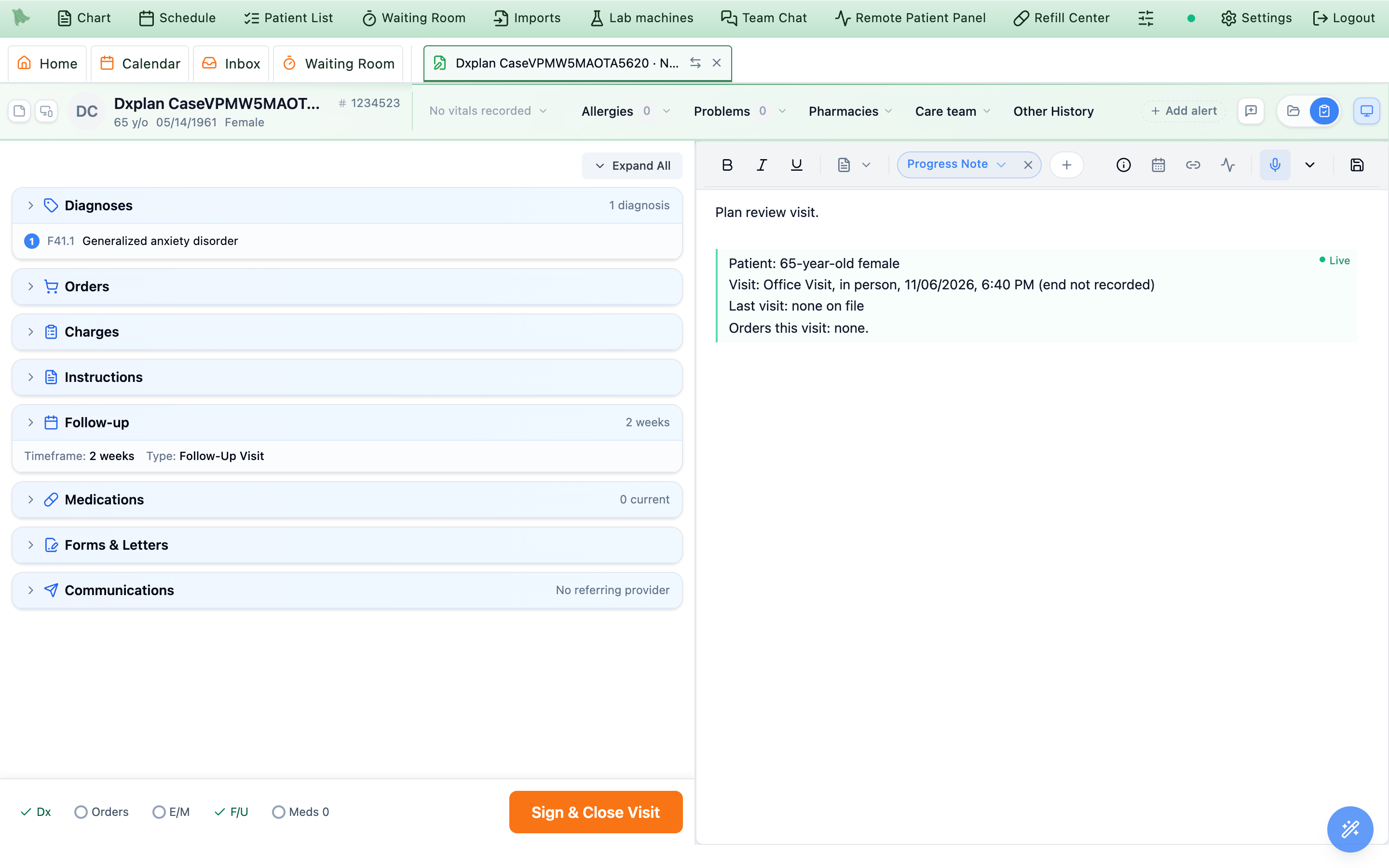
Live.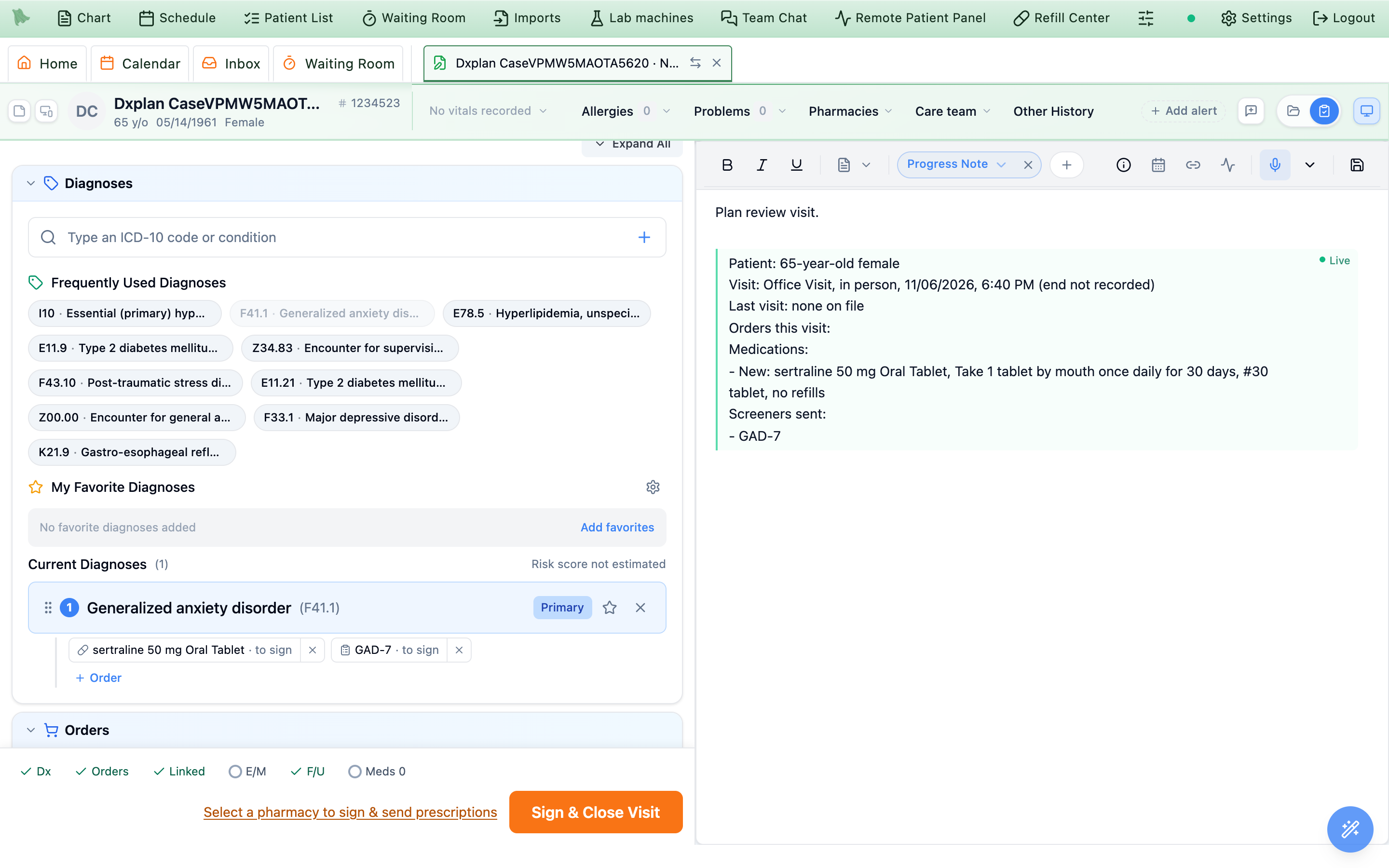
To put only today’s medications in the note, see 6.38b.
In a template. Put visit phrases in a phrase of your own or a visit type’s starter text as @visitsummary@, @visitorders@, @rxtoday@ or @visittime@. They are live in every note the template starts, so the top of the note fills itself without typing a phrase each time.
Good to know
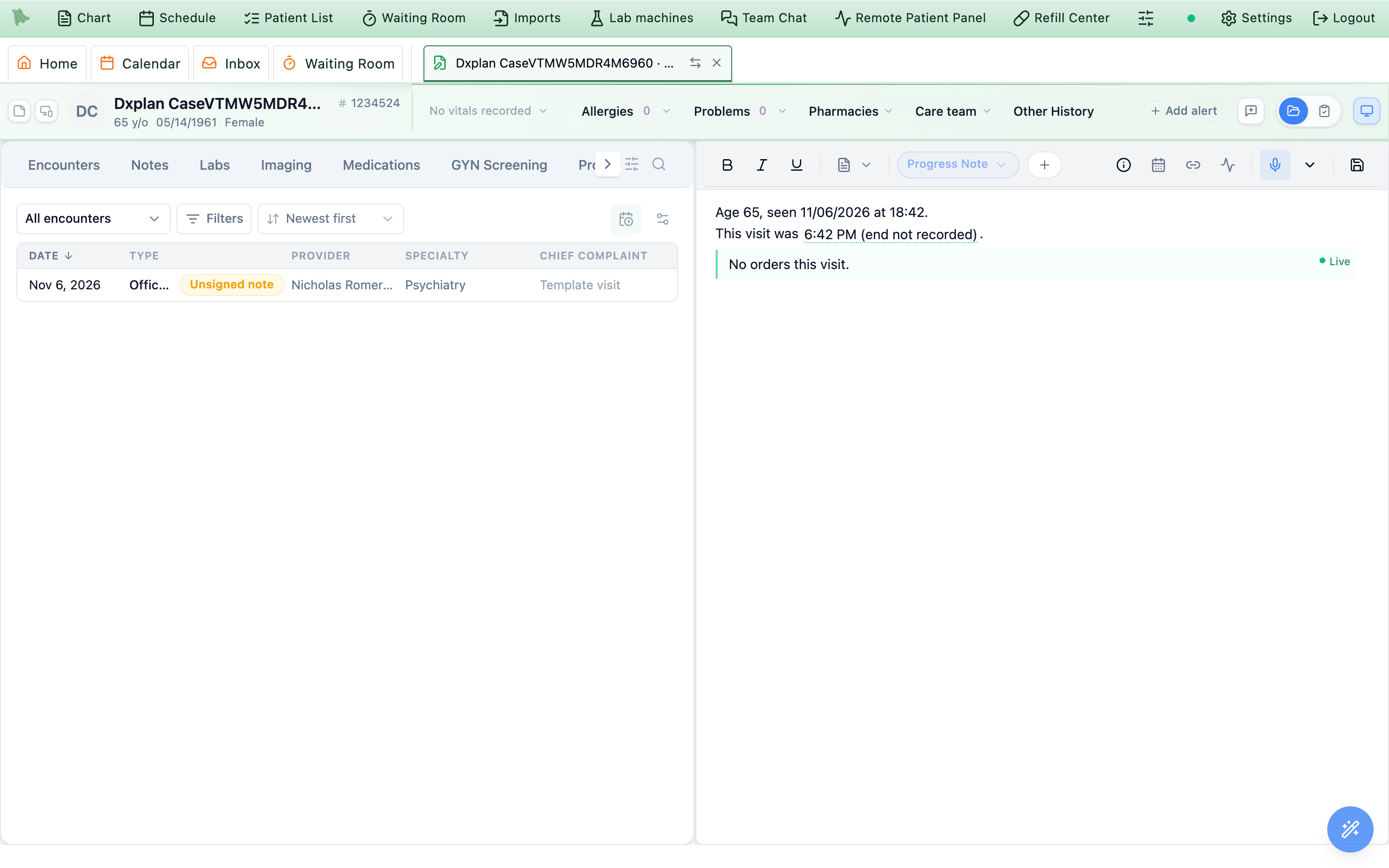
- Only on screen. The green bar and
Livelabel show only while you edit. Printouts, faxes, PDFs and exports show ordinary text. - Your own words win. Edit the text and it stops updating and stays as you wrote it.
- Times. Visit times come from what the visit recorded: check-in, start and check-out; video join and end; the phone connection. With nothing recorded they use the appointment’s time and length. If only the start is known, the note says “(end not recorded)” rather than guessing.
- Medication labels. A label shows only when the chart says so plainly: New when the patient was not on that medicine, Changed when the strength differs, Refilled when the strength and directions match. Otherwise the line has no label.
- Permissions. If your role can’t see a kind of order (for example labs), the phrase leaves it out and says so: “Not shown (your role can’t view them): labs.”
- Addenda. In an addendum, visit phrases already in the note stay as they were signed.
Put the medications you prescribed or refilled today into the note: .rxtoday
Looking for a smart block that writes today’s prescriptions and refills into your note? Use .rxtoday (also .medstoday and .refillstoday). It lists every medication prescribed, refilled, changed or stopped this visit, with its directions, quantity and refills, so you never type them or look them up in Orders.
- Type
.rxtodaywhere today’s medications belong in the note. For example under Plan, then press Enter. Or put@rxtoday@in your refill or follow-up template so every note starts with it. - Prescribe, refill or stop medications as usual. The list keeps up by itself until you sign, for example New: sertraline 50 mg oral tablet, take 1 tablet by mouth once daily for 30 days, #30 tablet, no refills.
- Sign the visit. The list becomes plain text in the signed note, exactly as it read at signing.
- Labels. Each medication is marked New, Changed (with the old strength), Refilled or Stopped only when the chart shows it plainly; otherwise the line has no label.
- Everything else you ordered. For labs, imaging, referrals, screeners and education as well, use
.visitorders; for the whole top of the note,.visitsummary(6.38a). - Reordering several at once. Repeat last visit adds every prescription from an earlier visit in one step, and
.rxtodaythen lists them all.
Use the specialty phrases
Specialty phrases cover pregnancy and obstetrics (.prenatal, .obintake, .obvisit, .postpartum, .ga, .edd), psychiatry, endoscopy, wellness visits and more. Some phrases belong to a specialty feature that an administrator turns on in Admin → Additional Features. While the feature is off its phrases are hidden from the list; a phrase of your own with the same name still works.
| Shortcut (also) | Inserts | Needs |
|---|---|---|
.prenatal | A routine return prenatal visit: gestational age, EDD and G/P from the chart, interval history with the cardinal symptoms, warning symptoms, vitals, fundal height, fetal heart rate, presentation, urine, edema, and a plan driven by gestational age. | Obstetrics (for the GA, EDD and G/P values) |
.obintake | A new obstetric intake: obstetric, gynecologic, family and genetic history, chart-backed medical context, a risk-assessment block (preeclampsia and aspirin, preterm birth, diabetes and thyroid, VTE, mental health and safety), and the first-visit order checklist. | Obstetrics |
.obvisit | One dated prenatal exam row (date, gestational age, blood pressure, weight, urine, edema, fundal height, fetal heart rate, presentation, movement, contractions, bleeding, fluid, cervix). Stamp it into the .obexam log at each visit (6.40); its date and gestational age never change afterward. | Obstetrics |
.postpartum | A postpartum visit: delivery summary, interval history, feeding, mood screening with score, sleep and supports, vitals, contraception, and the transition back to ongoing care. | Every practice |
.ga (.gestationalage), .edd (.duedate), .gpa (.tpal) | Gestational age today (32w4d; [long] spells it out, [full] adds the EDD), the EDD with its dating method, and the G/T/P/A/L summary, from the active pregnancy. | Obstetrics |
.psychhistory (.pphx, .pptx) | Past psychiatric history: medication trials, suicidality and self-harm, hospitalizations, with the last review. | Psychiatric History |
.bpph | Brief past psychiatric history: medication trials, suicidality and self-harm, hospitalizations and other history, one line each. | Psychiatric History |
.psychmedtrials (.medtrials), .suicidehx (.sihx), .psychhosp (.psychadmits) | Psychiatric medication trials (dose, period, response, adverse effects, reason stopped); suicidality and self-harm history; psychiatric hospitalizations. | Psychiatric History |
.bhhx (.bhhistory) | A behavioral health history bundle: psychiatric, substance use, social and family history. | Psychiatric History |
.antithrombotics, .glp1meds | Anticoagulants and antiplatelets on the medication list; GLP-1 agonists with SGLT2 inhibitors and insulin, for procedure planning. | Endoscopy procedure notes |
.lastcolonoscopy, .lastegd | The most recent colonoscopy (or sigmoidoscopy) or EGD on the chart, with findings and recall. | Endoscopy procedure notes |
.gifamilyhx, .endolabs | Family history of GI cancer and polyps; hemoglobin, platelets, INR and ferritin from the last 180 days. | Endoscopy procedure notes |
.awvhra, .awvfunction, .awvfalls, .awvproviders, .awvschedule | From the Medicare health risk assessment and the chart: an HRA summary, daily activities with hearing, vision and home safety, falls in the past year, current providers and suppliers, and the screening schedule from the written prevention plan. | Medicare annual wellness visits |
.brainhealth | A dated Brain Health snapshot card built from questionnaires, vitals, history, labs, imaging and diagnoses. | Neurology & Brain Health |
.medsgiven (.injections, .given) | Medications given in clinic this visit: product, dose, site, NDC, lot and expiration, who gave it, waste and response. See In-office medications. | In-office medications |
.homeexercise (.exerciseplan) | The patient’s current home exercise program with doses, instructions and what the patient logged. | Home exercise programs |
.xr_normal_foot, .xr_normal_ankle, .xr_hallux_valgus, .xr_calcaneal_spur, .xr_first_mtp_oa, .xr_fracture, .xr_post_op_hardware | X-ray report templates in the DICOM dashboard’s report box: technique, findings and impression. A report with a blank left (“angle __ degrees”) cannot be signed. | DICOM dashboard |
.prenatal, .obintake and .obvisit appear for every practice, but their gestational age, EDD and G/P values come from the pregnancy episode, which only exists with the Obstetrics feature on. Turn it on before using them.Keep a plan with the patient: persistent dot phrases
Use a persistent dot phrase for text that should follow one patient from visit to visit instead of being rewritten each time: a psychotherapy treatment plan, therapy objectives, or a pregnancy exam log. A persistent phrase saves its text to the patient. The first time you type it for a patient, the note gets the template with chart values filled and *** blanks to write. What you write is saved to that patient and comes back the next time anyone types the phrase for them, so a treatment plan or a pregnancy log carries forward from visit to visit. In the note it shows as a blue box labeled with the phrase’s name. A saved value holds up to 10,000 characters.
| Shortcut | What it is |
|---|---|
.psychtxplan | A Medicare-compliant outpatient psychotherapy treatment plan. Filled once: patient name, date of birth, MRN, insurance, provider and NPI, the date established, the next review (90 days later), a primary diagnosis dropdown from the problem list and the plan type. Every clinical narrative (target symptoms, medical necessity, goals and measurable objectives, interventions, frequency and duration, discharge criteria) is a blank you write, because auditors flag cloned plans. The periodic review date and the next review date refresh each time the plan is pulled up. |
.obexam | A prenatal exam log that lasts the whole pregnancy, newest visit first. Type .obvisit to stamp today’s dated exam row at the top; earlier rows stay exactly as documented, with the date and gestational age they were written with. |
Create a persistent dot phrase
- Open
Settings → Dot Phrases → Persistent(Saved per patient). - Fill in
Create Persistent Phrase.Shortcut(for example.pTherapyObjective1),Description, andPlaceholder Label, the name shown in the blue box. PressSave. - Type the shortcut in a patient’s note. Write the text the first time; at every later visit for that patient the phrase brings back what was saved, ready to update.
Your own persistent phrases are listed with Hero’s. Hero’s persistent phrases show a System chip and can’t be edited.
Use Smart Blocks: insert, fill and share them
To use a Smart Block, type a period and its shortcut in the note (for example .awv or .pt) and pick it from the list. A Smart Block is a form inside the note. In the dot phrase list it shows as “smart form (AI-fillable)”. Fill it with the keyboard or mouse, or dictate: during dictation or an ambient recording the block fills from what was said, and only from what was said. Fields can pull values from the chart while they are empty; a small link mark shows a pulled value. The block prints as ordinary note text. A note template can place a block with @awv@, @pt@ and so on (Note templates).
| Shortcut | Block | What it captures | Needs |
|---|---|---|---|
.colonoscopy | Colonoscopy | Colonoscopy and flexible sigmoidoscopy reports (6.42). | Endoscopy procedure notes; codes need Endoscopy coding |
.egd | EGD | Upper endoscopy reports (6.42). | Same as above |
.awv | Annual Wellness Visit | The Medicare annual wellness and Welcome to Medicare visits (6.43). | Medicare annual wellness visits |
.pt | Physical Therapy | Evaluations, daily notes, progress reports, re-evaluations and discharges: range of motion, strength and special-test tables, outcome measures with fall-risk flags, the exercise flowsheet, goals, and treatment time per service, which becomes charge lines under the 8-minute rule. See Physical therapy. | Physical therapy (on by default) |
.pdtry | Foot & Ankle Exam | Pulses, vascular and neurologic signs on each side, nails and corns or calluses on a two-foot figure, deformities, procedure and plan. | Every practice; routine foot care coding needs Podiatry routine foot care coding |
.dental | Dental Exam | Oral hygiene, soft tissue, TMJ, a tooth-grid odontogram with periodontal charting, perio stage and grade, occlusion, caries risk, radiographs, treatment plan and recall. | Every practice |
.entlaryngoscopy | ENT Flexible Laryngoscopy | Indication, topical prep, consent, an exam checklist from nasal cavity to hypopharynx, vocal fold mobility, tolerance and complications, starting from a normal exam. | Every practice |
.neuroexam | Neurologic Examination | A complete normal neurologic exam with laterality (mental status, cranial nerves, motor, reflexes, sensation, coordination, gait) that dictation or clicks then change. | Neurology & Brain Health |
.skinphotos | Skin photos | Skin photos with a caption per photo and a photo interpretation; .derm, .lastderm and .dphotos put photos into it. | Every practice |
.skincurrent (.dcurrent) | Current visit skin photos | The same block, limited to photos the patient sent for this visit. | Every practice |
.spravato | Spravato Treatment | A Spravato (esketamine) session: check-in and screening, MADRS, Aldrete and CADSS before and after, the dose, monitoring vitals, discharge, REMS and coding, for VA and standard programs. | Every practice |
.ketinfusion | Ketamine Infusion | An IV ketamine infusion: check-in and screening, MADRS, Aldrete and CADSS before and after, the weight-based dose, IV access, monitoring vitals, discharge, VA attestation and coding, for VA and Non-VA programs. | Every practice |
.ketim | Ketamine IM Injection | An IM ketamine injection: check-in and screening, MADRS, Aldrete and CADSS before and after, the weight-based dose, the injection, monitoring vitals, discharge and coding, for VA and Non-VA programs. | Every practice |
A practice can have its own copy of a built-in block under the same shortcut, for example a .spravato whose staff fields list your nurses (Hero can set one up with your practice’s staff list); it then replaces Hero’s block in your practice, and the Smart Blocks list marks it Replaces built-in.
Build your own block, or copy a built-in one and change it, under Settings → Dot Phrases → Smart Blocks (6.45).
Share a Smart Block with others
- Open
Settings → Dot Phrases → Smart Blocks. The list has three groups:Mine(yours to edit),Practice(shared by colleagues; everyone here can insert them) andBuilt-in(Hero’s; clone one to make it your own). - Click
Shareon one of your blocks underMine(tooltip Share with the practice), or turn onShare with the practicein the block builder. It gets aSharedchip and everyone at the practice can insert it; colleagues see it underPracticeas Shared by <your name>, read-only, and can clone it. - Stop sharing with
Stop sharing; colleagues no longer see it.
Document endoscopy with the colonoscopy and EGD blocks
Type .colonoscopy for a colonoscopy or flexible sigmoidoscopy, or .egd for an upper endoscopy. An administrator turns on Endoscopy procedure notes (the blocks) and, separately, Endoscopy coding (the codes) in Admin → Additional Features; both start off. The block has four tabs.
| Tab | What you record |
|---|---|
| Pre | Indication chips (22 lower, 20 upper), each carrying screening, surveillance or diagnostic, a risk level and its ICD-10 code; indication details; antithrombotics, GLP-1 medicines, allergies, the last procedure, GI family history and recent labs from the chart; medication management; ASA class and Mallampati; consent, H&P, time-out and monitoring attestations. |
| Procedure | Sedation type, anesthesia provider and independent observer; medication doses; sedation, scope-in, cecum-reached and scope-out times; scope ID. Colonoscopy: prep agent and regimen, Boston Bowel Prep Scale by segment, extent (terminal ileum included), cecal landmarks, retroflexion, perianal exam and DRE. EGD: extent, Z-line and diaphragmatic pinch, Hill grade, gastric retroflexion and a photo-site checklist. Techniques such as CO2, water exchange, cap, NBI, chromoendoscopy and CADe. |
| Findings | One row per finding, each printing a full report sentence: type, site, count, size, Paris or LST morphology, a grade where one applies (LA A–D, Forrest, hemorrhoid grade, varices, Mayo, Rutgeerts, NICE), Prague C&M, the intervention (snare, biopsy, EMR, clips, injection, banding, dilation and more), en bloc or piecemeal, retrieval, and the specimen jar, numbered for you. “Rest of exam normal” covers the rest. |
| Wrap-up | Complications, blood loss, tolerance and disposition; the impression, written from the findings with room for your own text; recommendations; and the repeat interval. |
Enter findings quickly
- Anatomy map. Click a segment of the colon or upper GI tract to add a finding there, with that segment’s usual findings offered first. Numbered markers show each finding; segments beyond the reached extent are drawn as not reached.
- Quick entry. Press F or / and type a finding in shorthand, in any order (
p 6 is asc cs ret j1: a 6 mm sessile polyp in the ascending colon, cold snare, retrieved, jar 1). A preview sentence shows as you type; Enter adds it and ↑ edits the last one. - Favorites. Keys 1–9 add a favorite finding (“Polyp, cold snare, retrieved”, diverticulosis, an irregular Z-line, Barrett’s with Seattle biopsies); keep up to 18 of your own.
- Normal defaults. N fills normal defaults into empty items only, each tagged “Default”: the indication, ASA II, sedation, extent and landmarks, a Boston prep score of 3-3-3 when the cecum was reached, retroflexion, no complications and the guideline recall. Times, doses, providers, measurements and a finding’s size, site or technique are never defaulted. Built-in “All normal” templates exist for colonoscopy, flexible sigmoidoscopy and EGD.
- Your templates. Alt+S saves the tabs you choose as a template; T and a digit applies one. Patient-specific values are never saved.
- From the chart. Alt+F suggests indications with their evidence (prior procedures, the problem list, family history, a positive stool test, low hemoglobin or ferritin, a colorectal screening care gap, a referral) and fills medications, allergies, prior procedures, family history and labs into empty fields.
- Dictation. D dictates; the block understands endoscopy shorthand and makes one row per finding, keeping times and prep scores only when they were said.
What the block works out for you
- Times. Alt+I, Alt+C and Alt+O stamp scope in, cecum reached and scope out with the current time. Insertion and withdrawal minutes are calculated, and a withdrawal timer shows OK from 8 minutes and warns under 6.
- Repeat interval. A suggested recall from the guidelines (US Multi-Society Task Force polyp, family history and age rules for colonoscopy, with a pending-pathology version; ACG Barrett’s and AASLD varices rules and short-interval rechecks for EGD). Alt+Enter accepts it and writes the guideline basis into the note. On an EGD, a pinch at least 2 cm below the Z-line suggests a hiatal hernia with its length.
- Readiness. “Ready n/m” lists what is still missing (indication, ASA, sedation, consent, prep, extent, landmarks, withdrawal time, polyp size and retrieval, LA grade, recall) and jumps to each item. It never blocks signing.
- Note text. The report prints as a section-headed note: sedation, times with insertion and withdrawal minutes, prep with its Boston total and adequacy, extent and landmarks, each finding as a sentence, the impression, and a Specimens list. Alt+R shows the exact text.
Codes
With Endoscopy coding on, the block’s Codes section shows the procedure and diagnosis codes as you chart, and completing the visit adds them to Charge Capture with a note explaining each choice.
| Situation | How it is coded |
|---|---|
| Procedure | One code per technique: for example biopsy 45380 / 45331 / 43239, snare 45385 / 45338 / 43251, EMR 45390 / 45349 / 43254 (colonoscopy / flexible sigmoidoscopy / EGD); the base code only when nothing else was done. On one lesion, EMR outranks snare, which outranks hot forceps, and removal absorbs a biopsy. |
| Medicare screening, nothing removed | G0121 (average risk) or G0105 (high risk); G0104 for a screening sigmoidoscopy; KX after a positive stool test. |
| Screening that became therapeutic | The procedure CPT with modifier PT (Medicare) or 33 (commercial plans). |
| Incomplete colonoscopy | Modifier 53 without therapy, 52 with therapy; not past the splenic flexure codes as a sigmoidoscopy. |
| Moderate sedation | G0500 (Medicare) or 99152, plus 99153 per additional 15 minutes, when an independent observer and times are recorded. Anesthesia (MAC or general) gets a note naming the anesthesia code instead. |
| Diagnoses | Z12.11 first for screening, then high-risk and history codes, R19.5 after a positive stool test, and the findings’ codes; a note warns that a polyp diagnosis may change after pathology. |
Modifier 59 is added only on specific NCCI pairs; XS is never added automatically. Press ? in the block for every shortcut; Alt+1–4 or [ ] switch tabs, and typing 332 in the prep row sets all three Boston scores.
Record a Medicare wellness visit with the AWV block
Type .awv for the initial annual wellness visit (G0438), the subsequent annual wellness visit (G0439) or the Welcome to Medicare visit (G0402). It needs Medicare annual wellness visits, which an administrator turns on under Admin → Care programs; it starts off.
- Sections. Visit (type and supervised staff), health risk assessment, history and current providers, measurements with BMI, cognition, depression, functional ability and home safety, falls with the CDC STEADI tests, alcohol, tobacco and drug use, physical activity and nutrition, advance care planning with a timer (Alt+T), the prevention plan, and other services today. A Welcome to Medicare visit hides the health risk assessment and cognition sections.
- Nothing defaulted. An empty field means not assessed and the note prints only what you recorded. Quick entries (“No falls, steady, not worried”) record a normal section in one click without touching scores or minutes.
- From the chart. Empty fields fill from the patient’s health risk assessment and screens for this visit, today’s vitals, opioid prescriptions, the health care agent, an advance directive and the screening schedule, using the chart phrases in 6.38 and 6.39.
- Eligibility and checklist. A line at the top says which visit Medicare pays today and when the last one was; chips show each required element, done or missing, and jump to it.
- Codes. Charge Capture adds the visit code and companion codes (advance care planning 99497, G0136, G0444, G0442/G0443, tobacco counseling, the Welcome visit ECG) only for what was documented, with their own minutes where Medicare requires them, and explains each line.
- Prevention plan. Alt+P builds the written plan from the chart and a guideline table, to use in the note, print or send to the portal.
Two note templates (“Medicare Annual Wellness Visit (with .awv)” and a prose version) let dictation fill the visit. For the program around the block, see Medicare wellness visits and care management.
Chart tokens list: put chart values (@chartmeds@, @chartallergies@) inside your own phrases
This is the full list of tokens such as @chartmeds@, @chartallergies@, @name@ and @today@. When you write a phrase, these tokens in its text are filled each time the phrase is inserted.
| Token | Becomes |
|---|---|
@shortcut@ | Any phrase above, filled once when the phrase is inserted, with options separated by spaces: @name@, @dob@, @mrn@, @insurance@, @today@, @date +90@, @age written@, @lastvitals 3@, @me@, @mynpi@, @dxpick@, @diagall@, @ga@. Visit phrases such as @visitorders@ and @visittime@ stay live until the visit is signed (6.38a). Your phrases can include each other up to five levels deep. |
@live:shortcut@ | A field that updates itself (green dotted underline). In a persistent phrase it is filled again every time the phrase is pulled up, for example @live:today@ or @live:date +90@ for a review date. |
@hero: your question@ | An AI answer about this patient, written when the phrase is inserted. |
@datepicker@ | An editable date field with a calendar. |
{{A|B|C}} | A dropdown starting on the first choice. Put the neutral choice first. |
*** | A blank to fill; F2 jumps to it. The editor toolbar has a button that inserts one. |
@chartmeds@, @chartallergies@, @chartvitals@, @chartmedicalhx@, @chartsurgicalhx@, @chartfamilyhx@, @chartsmokinghx@, @chartsocialhx@ | The chart lists the note modules use: medications, allergies, vitals, and medical, surgical, family, tobacco and social history. Psychiatric history tokens (@chartpsychhx@, @chartpsychmedtrials@, @chartsuicidehx@, @chartpsychhosp@) need Psychiatric History. |
@refillmeds@, @refillmedsinline@, @refillpharmacy@, @refillprescriber@, @refillpdmp@ | Refill Center notes and messages only: the medicines refilled (as bullets or one line), the pharmacy, the prescriber and the PDMP sentence. @offerdate@, @offertime@ and @offerclinician@ fill an offered appointment in a quick message. |
@awv@, @pt@, @skinphotos@ (any block) | In an AI note template only: places that Smart Block in the generated note. |
A token that can’t be filled shows an error in brackets, and in a persistent template it becomes a *** blank. A chart token you don’t have access to inserts nothing.
Make, share and replace phrases
Open Settings → Dot Phrases. It has five sections:
| Section | What is there |
|---|---|
| My phrases | Phrases you write and edit. Staff without a provider profile don’t have this section. |
| Practice | Phrases shared with everyone at the practice. Everyone can use them; the writer, the provider they are filed under and practice template administrators can change them. |
| Built-in | Hero’s phrases on this page; chart phrases carry an “Auto-filled” chip. |
| Persistent | Per-patient phrases (6.40). |
| Smart Blocks | Your, your practice’s and Hero’s blocks, with the block builder. |
- Write a phrase. Phrases are written in the same editor as the note, so formatting,
***blanks,{{A|B}}dropdowns and the tokens in 6.44 all work. Providers and administrators can write phrases; an administrator without a provider profile can still add practice phrases. - Share it. Turn on sharing and the phrase shows a Shared chip: everyone at the practice can use it.
- Copy one to change it. Make a copy of any phrase, a built-in one included, into My phrases and word it your way.
Which phrase wins. When two phrases share a shortcut, yours wins, then Hero’s built-in one, then a colleague’s shared one. So your own .soap replaces Hero’s, but a colleague’s shared .soap does not; the settings page marks a phrase that is “used instead”.
Smart Blocks. The builder has a field list, field settings and a live preview. Fields can be checkboxes, chips, selects, text, numbers, dates, a tooth grid, an exam checklist, photo findings or physical therapy tables, each with its own AI fill instructions and an optional “Pull from chart” from a chart phrase. A block shortcut is lowercase letters and digits starting with a letter; picker names such as .lab are reserved. Cloning a built-in block makes your own copy; a clone of a block that needs a feature keeps needing it.
Elsewhere. Map a phrase to a visit type as its starter text (Note templates), choose a phrase as your co-sign statement (Co-signing), or make a practice phrase the default refill note or message (Refill Center).
Need help? Email support@heroemr.com.